Tips · Oct 15, 2026 · 9 min read
How to Make a Discord Bot Without Coding: A Trivia Example
This guide shows how to make a Discord bot without writing code, with a trivia bot as the example. The bot posts fixed questions with answer buttons, keeps a score for each member, and ignores repeat presses. You describe it to camel-builder, test it privately, publish it, then change it and roll the change back.
Two ways to make a Discord bot
Most guides on how to make a Discord bot teach coding: you write it with discord.js or discord.py and keep it running on a machine you manage. That route suits learning to program.
The no-code route suits server owners who would rather describe a bot than maintain one. In camelBot, camel-builder writes and tests the bot from your description, you try it in a private test channel, and you decide when to publish, change, or roll it back. camelBot runs each bot and its database, so there is no server to rent. If a ready-made public bot already does what you want, invite it instead; build your own for your own questions and rules.
What a good Discord trivia bot does
A trivia bot is a good first bot: it uses a slash command, buttons, saved data, and a rule about who can do what.
- Fixed questions. Ten questions in the bot, posted in order, with no AI.
- Answer buttons. One per choice, for anyone in the channel.
- Private feedback. Only the person who pressed sees whether they were right.
- One answer per question. Only a member's first press counts.
- Saved scores. Each member's score stays between trivia nights.
- A leaderboard without pings. The top 10 by name.
- A staff-only reset. Only members with Manage Server can zero the scores.
What you need
- A Discord account. You sign in at bots.camelai.com with Discord.
- The Manage Server permission in the server where the bot will live.
- Optional: your own Discord app (about 5 minutes on Discord's developer site).
- No credit card and no code. camelBot is free while in beta.
Step 1: Describe the trivia bot
Sign in, and the first screen asks What should your bot do? Paste this, then select Continue:
Make a trivia bot for our server with a fixed list of 10
general-knowledge questions, four choices each, and no AI.
The first is: "Which planet is the largest?" Jupiter, Saturn,
Neptune, Mars. The answer is Jupiter. Write the other 9.
/trivia posts the next question in list order for everyone to
see, with one button per choice. After question 10, start over.
Anyone can answer. Only your first press on each posted question
counts: a right answer adds 1 point to your score, a wrong one
adds nothing. Tell only the person who pressed whether they were
right, and if not, what the answer was. Any later press on that
question adds nothing and says you already answered.
Save each member's score. /score shows your own score privately.
/leaderboard shows the top 10 by name, without pinging anyone.
/reset-scores sets every score to zero. Only members with the
Manage Server permission can use it.
This prompt worked as written, with no follow-up questions. It names every command, says who may reset scores, gives the first answer so you can test it, and covers repeat presses, a rule that's easy to leave out.
Step 2: Choose Camel's app or your own app
Next, choose how the bot shows up in Discord. Both options support the same features, and you can switch later.
| Camel's app | Your own app | |
|---|---|---|
| Replies come from | camel, using the server's shared bot name and picture | Its own name and picture |
| Commands | /quizzy trivia | /trivia |
| The reset command | Listed for everyone, refused without Manage Server | Normally hidden from members without Manage Server |
For a first bot, pick Camel's app, marked Recommended. Its Use this name and picture in Discord option is on by default. If quizzy is the first bot added with this option, camel uses quizzy's name and picture. Bots on Camel's app share one look per server: after we added quizzy to ours, another bot's older replies showed quizzy's name and picture too.
For a standalone bot, create an application in Discord's Developer Portal and paste its bot token into camelBot's token field, never into the chat. The own app guide walks through it.
Then name the bot. On Camel's app the name is also the command, so it's lowercase, up to 32 characters. Select Create quizzy.
Step 3: Let camel-builder build it
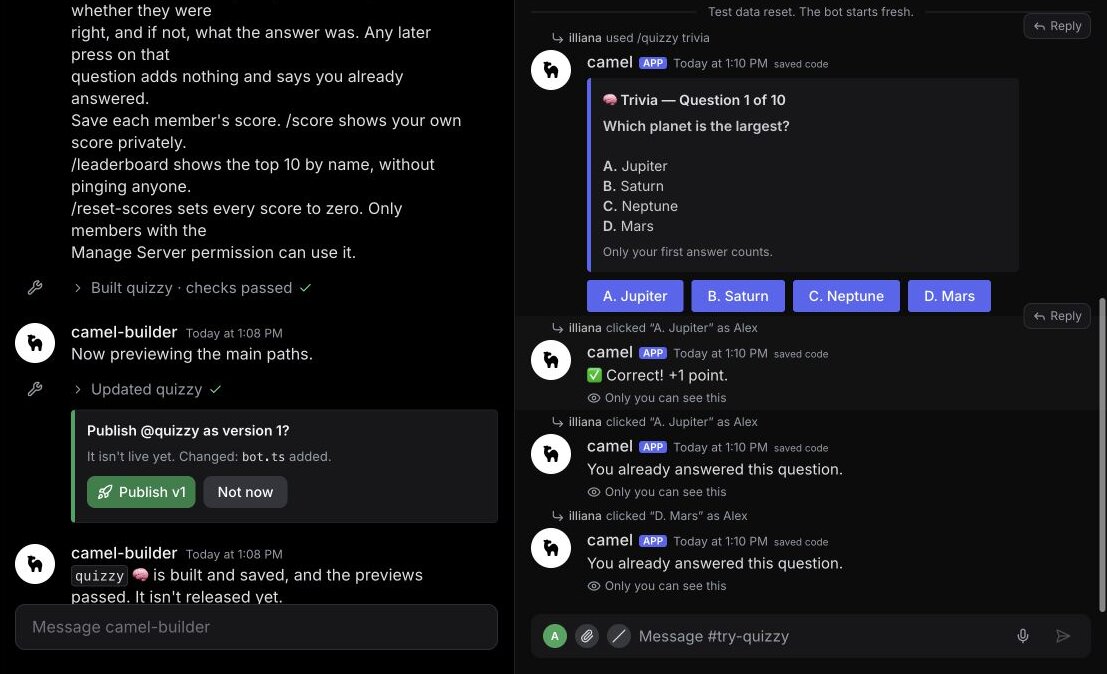
The chat opens with #try-quizzy beside it, and camel-builder is working… shows under the message box while it writes, checks, saves, and tries each command. Ours showed Built quizzy · checks passed, then replied "quizzy is built and saved, and the previews passed. It isn't released yet."
Its summary listed each command and the nine questions it wrote. It also named two things it hadn't tested: the wrap-around after question 10 and the Manage Server rule on reset. Step 4 covers both.
Changes are more messages, such as "add 10 more questions about our favorite game". camel-builder saves each change but never publishes on its own.
Step 4: Try it in the test channel
#try-quizzy is the bot's private test channel: only you see it, and nothing goes to Discord. Your messages run the saved code, what a publish would put live. camel-builder's own tries share the test data, so start with Reset test data in the ⋯ menu. Test as three people:
- Run
/quizzy trivia. "Which planet is the largest?" appears with buttons A. Jupiter to D. Mars. - Select the first button in the message box and, under Talk as, pick Alex. Press A. Jupiter: "Correct! +1 point.", marked Only you can see this.
- Press A. Jupiter again, then D. Mars. Both get "You already answered this question."
- As Sam, press B. Saturn: "Not quite. The answer was A. Jupiter." Sam's next press is refused as already answered.
- In
#general(same menu), run/quizzy trivia: question 2 posts. As Sam, press the correct answer for your generated question. Ours was C. Canberra. - Run
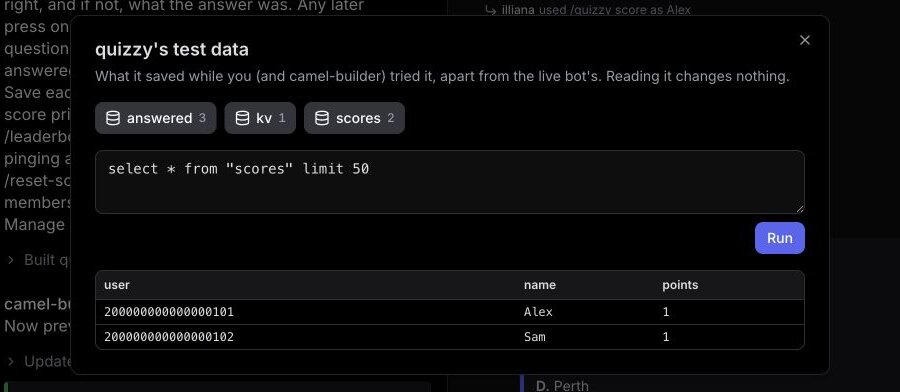
/quizzy scoreas each person, then open Look at test data in the ⋯ menu: Alex and Sam should each have 1 point, and three answers should be saved. - Run
/quizzy leaderboard: names appear as plain text, not mentions. - As Alex, run
/quizzy reset-scores. It's refused. - Run
/quizzy trivianine more times: questions 3 to 10, then question 1 again. Alex's A. Jupiter on that new posting counts. - As yourself, run
/quizzy reset-scores: "All scores are now zero (2 players reset)."
In the test channel, only Alex's first press on a question scores.
Step 8's refusal reads "Your bot hit an error on /quizzy reset-scores: Alex can't use /reset-scores: it needs Manage Server. Try it as yourself (the server's owner)". That's the rule working, not a bug: Alex and Sam have no permissions, and you count as the test server's owner. For any other Your bot hit an error on message, tell camel-builder "fix that"; it sees what you tried.
Before you publish: a checklist
- A second press, on any button, adds nothing.
- Questions go in order and start over after question 10.
- Alex and Sam have separate rows in Look at test data.
- Alex can't reset scores, and you can.
Step 5: Publish it and add it to your server
When quizzy was saved, a card in the chat asked Publish @quizzy as version 1? with "It isn't live yet. Changed: bot.ts added." and no extra Discord permissions. Select Publish v1.
Then select Add to Discord above the test channel. On Discord's screen, pick the server and a channel such as #trivia, check the permissions, and select Authorize. The bot's page then shows Live in and the channel.
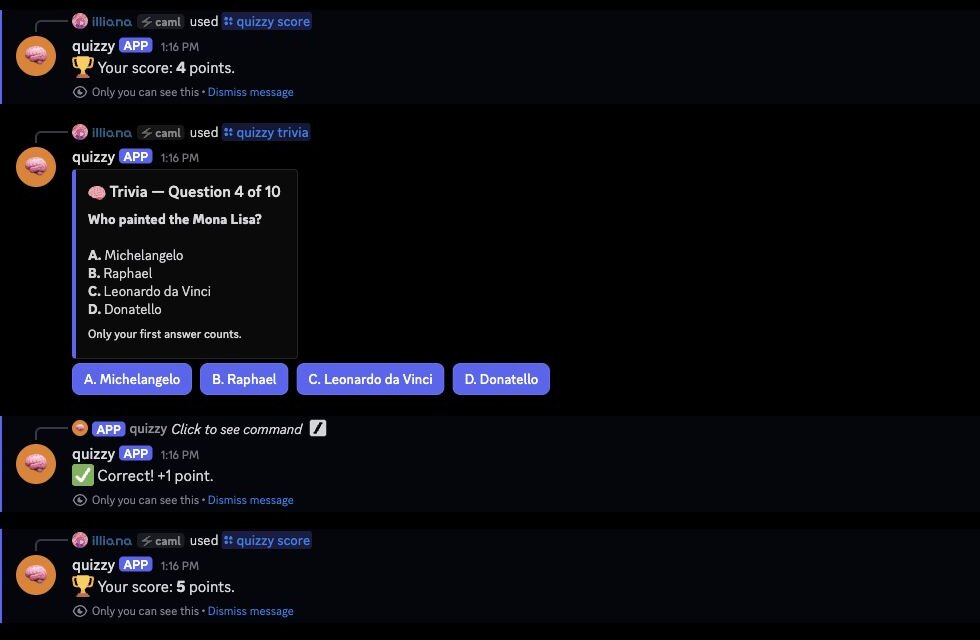
In Discord, run /quizzy trivia. In our server the live bot started at question 1: A. Jupiter scored a point, a repeat press got the already-answered reply, and both replies were marked Only you can see this. /quizzy leaderboard listed only our account: Alex and Sam stayed in the test data.
We tested with one account, so ask a friend without Manage Server to check the rest. Discord shows Only you can see this replies only to the person who triggered them, so you shouldn't see their answers. Their score should be separate from yours. On Camel's app, reset-scores stays in their /quizzy menu because the other commands are public, but the bot should refuse it.
Step 6: Change it, then roll back
Every publish is a version you can go back to. Try it with a one-night change. Send this in the chat:
For trivia night, make right answers worth 2 points.
Leave the scores people already have as they are.
camel-builder said it "didn't touch any saved scores" and that the change was saved but not released. Here's what happened next:
- Test channel. Post a question and answer it correctly as Alex: "Correct! +2 points."
- Discord. The live bot still runs version 1, so our next right answer took us from 1 to 2.
- Publish version 2. Our next right answer in Discord took us from 2 to 4.
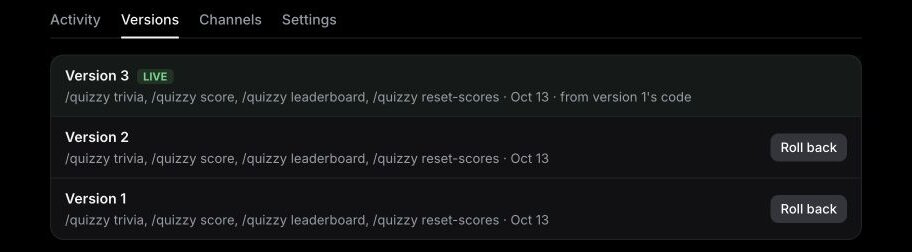
- Roll back. On the bot's page, open Versions, select Roll back on version 1, and confirm. Version 3 goes live, "from version 1's code".
Here is what the scores did:
| Stage | Test channel (Alex) | Discord (our score) |
|---|---|---|
| Change saved, not published | 0 to 2 (+2) | 1 to 2 (+1) |
| Version 2 published | not tried | 2 to 4 (+2) |
| After the rollback | 2, then 3 (+1) | 4, then 5 (+1) |
The rollback switched the code in both places, since it also replaces the saved code, and kept the data in both: version 2's points stayed, and right answers were worth 1 again. In Discord, our score went from 4 to 5.
The Versions tab appeared once quizzy had a second version. A rollback restores code, not data. For a clean slate, save a .sqlite copy with Download its data in Settings, then run /quizzy reset-scores.
Permissions a trivia bot needs
Discord's screen listed seven permissions: Change Nickname, View Channels, Send Messages, Send Messages in Threads, Embed Links, Read Message History, and Add Reactions. Change Nickname lets Camel's app show the bot's name. A trivia bot doesn't moderate, give roles, or make channels, so there's nothing else to grant and no role to move. camelBot never asks for Administrator; don't add it.
On Camel's app a bot sees every message in the channels you add it to, so add it only where you play.
Troubleshooting
| Symptom | Why | Fix |
|---|---|---|
/trivia isn't in the menu | On Camel's app, commands start with the bot's name | Type /quizzy and pick trivia |
| Alex's reset shows Your bot hit an error on | Alex and Sam have no permissions | Expected; run it as yourself |
A change works in #try-quizzy, not in Discord | It isn't published yet | Publish it |
Members see /quizzy reset-scores | On Camel's app, public commands keep it listed | The bot still refuses them |
Limits to know
| Limit | Value |
|---|---|
| Slash commands | 25 per bot, up to 25 options each |
| Saved data | 100 MB per bot |
| AI allowances | Daily, reset at midnight UTC |
The full list is in Permissions and limits.
FAQ
Can I make a Discord bot without coding? Yes. You describe the bot, and camel-builder writes, checks, and tests the code. You try it privately and decide when it goes live.
Does rolling back a Discord bot undo its saved data? No. A rollback changes code only. When we rolled quizzy back, the points earned under version 2 stayed, and the next right answer added 1.
Next steps
Now that you know how to make a Discord bot end to end, the same loop builds bigger ones, such as a Discord welcome bot or a Discord ticket bot. For more ideas, open the Discord bot builder page. camelBot is free while in beta, with no credit card; AI use in bots draws on a daily allowance.