Tips · Oct 21, 2026 · 10 min read
How to Make a Discord Economy Bot with Daily Rewards

This guide shows how to make a Discord economy bot that pays members 100 points a day with /daily, shows balances and a top 10 leaderboard, and runs a small shop with Buy buttons. You describe it to camel-builder, try it as pretend members in a private test channel, and add it to your server. The points have no money value, and nobody pays for anything.
What a good Discord economy bot does
An economy bot keeps a virtual currency balance for each member. The rules make it fair:
- One claim per day, with a stated reset. Every
/dailyreply says when the next claim opens. - Balances per member and per server. One member's claim never touches another's points.
- A leaderboard that doesn't ping. Names, not @mentions, and a rule for ties.
- Purchases that can't half-happen. The points and the item change together, or not at all.
- Staff corrections with a reason. Every change is recorded.
A ready-made economy bot is quicker if its standard rules fit; make one when you want your own reset time, items, or staff rules.
What you need
- A Discord account, to sign in at bots.camelai.com.
- Manage Server in your server. The bot also uses it to decide who is staff.
- A second Discord account without Manage Server, to check the staff rule.
- Optional: your own Discord app (about 5 minutes on Discord's developer site), for top-level commands like
/daily. - No credit card and no code. camelBot is free while in beta.
Step 1: Describe the points system to camel-builder
Sign in. The first screen asks What should your bot do? Paste this:
Build an economy bot with server points. Points are just for fun:
they have no money value and there are no payments.
/daily gives the member 100 points once per day. The day resets at
00:00 UTC for everyone, not 24 hours after a claim. A second claim
that day adds nothing. Both replies say the next claim opens at
00:00 UTC and how long that is from now.
/balance shows your points, or another member's if you pick one.
/leaderboard shows this server's top 10. Ties go to whoever reached
the score first. Leave out members with 0 points.
/adjust adds or removes points for a member, with a reason. Only
members with Manage Server can use it. Refuse a removal that would
take a balance below 0.
Keep points separate per server and per member. Record every change
(claim or adjustment) with who, how much, why, and when.
Show members' names in replies, not @mentions, so nobody is pinged.
"Not 24 hours after a claim" gives everyone one deadline instead of a rolling cooldown, and names instead of @mentions keep the leaderboard from pinging anyone.
camel-builder writes, checks, saves, and tries the code while camel-builder is working… shows. Ours asked no questions, finished with Built points · checks passed, and stated two assumptions: adjustments are whole numbers other than 0, balances are capped at 1,000,000,000, and there's no command to view the history yet.
Add a points shop
Once claims work, send a second message. Ours was:
Add a shop. /shop posts Party Hat for 50 points and Golden Trophy
for 300 points, each with a Buy button. Anyone who presses a Buy
button buys for themselves, and only they see the answer.
/buy with an item choice does the same.
Each member can own each item once. A purchase takes the points and
adds the item together, or does neither. If they already own it or
don't have enough points, refuse, say which, and change nothing.
Record purchases with the other changes, and list a member's items
in /balance.
We added a paragraph asking it to save without publishing and to report how it built the shop. It said items are keyed by server, member, and item, so each member owns an item once. One transaction checks ownership and funds, then writes the charge, the item, and the history row; a refusal returns before any write. camelBot's transactions undo their writes if an error stops them partway. We didn't read that code, force an error, or try simultaneous presses or a second server, but the tests below show the records agreeing.
Step 2: Choose Camel's app or your own app
camelBot then asks how the bot shows up in Discord:
- Camel's app (marked Recommended): nothing to set up. Commands start with the bot's name, as in
/points daily. - Your own app: about 5 minutes on Discord's developer site, for its own name, picture, and commands like
/daily. Its token goes in camelBot's token field, never the chat.
Both support the same features, and you can switch later. On your own app, Discord normally hides /adjust from members without Manage Server. On Camel's app, /points also holds public commands, so adjust stays in everyone's menu by default and camelBot refuses it for them. Name the bot points and select Create points.
Step 3: Test claims, purchases, and refusals in the test channel
Every bot gets a private test channel, #try-points; nothing there goes to Discord. The first button in the message box switches between you and pretend members Alex and Sam, who have no permissions. Start with Reset test data in the ⋯ menu, and quote option values that have spaces.
- As yourself, run
/points dailytwice. The first adds 100; the second says "you already claimed today." Both say when the next claim opens; ours read "00:00 UTC, in 6h 54m.", which matched the clock. - Claim as Sam, then as Alex in #general. Alex's repeat claim is refused, and
/points balance member:samshows Sam at 100. /points leaderboardlists you, Sam, and Alex at 100, in claim order. That's the tie rule.- As Alex,
/points adjust member:sam amount:500 reason:testshows under Your bot hit an error on: "Alex can't use /adjust: it needs Manage Server." That's expected, not a bug. - As yourself, run
/points adjust member:sam amount:250 reason:"event prize", then tryamount:-500on Alex: "Alex has only 100 points, so you can't remove 500. Nothing changed." - As Alex, run
/points shopand press Party Hat's Buy: "You bought the Party Hat for 50 points. Balance: 50." A second press: "You already own the Party Hat. Nothing changed."/points buy item:"Golden Trophy"is refused: "costs 300 and you have 50." - As Sam, press Party Hat's Buy on Alex's shop message. Sam pays, not Alex. Sam then buys the Trophy with exactly 300, leaving 0.
/points leaderboardshows you at 100 and Alex at 50. Sam, at 0, is left out.
camel-builder ran these steps for us, one at a time. The shop message is public; purchase answers carry Only you can see this.
Look at test data in the ⋯ menu then showed balances (3 rows), items (3), and ledger (7): three claims, Sam's +250, and three purchases. Refusals added nothing, and each member's history sums to their balance.
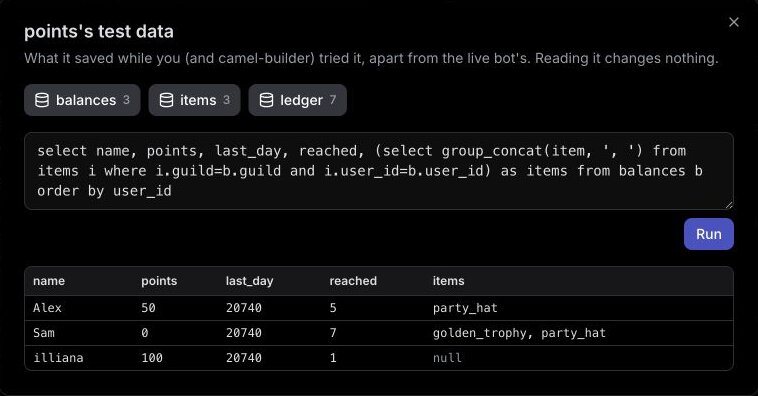
We haven't yet watched a real midnight pass with this bot. By design, the day turns over at 00:00 UTC: camel-builder reported that /daily compares the UTC day of the last claim with today's, with no schedule involved. To check it yourself, keep the test data and claim as Alex after the next 00:00 UTC, but less than 24 hours after Alex's first claim. Alex should gain 100, a repeat should be refused, and Sam's balance shouldn't move until Sam claims.
If something else fails, select Show details and tell camel-builder "fix that". It works when each claim credits only its member once per UTC day, a second Buy press charges nothing, and Alex and Sam can't adjust points.
Step 4: Publish it and add it to your server
After a save, our chat showed Publish @points as version 1? with no extra permissions. We selected Publish v1, then Add to Discord. The bot became live in our server's #camel-bots channel. camel-builder never publishes on its own.
You can also select Add to Discord in the test channel. Pick your server and channel, then confirm. For an unpublished bot, that confirmation publishes its saved code and adds it. If the app is already in your server, you may not see another Discord authorization screen.
In our server, we tested from the owner's account only. Live data is kept apart from test data, so the balance started at 0. /points daily added 100, the Party Hat sold once for 50, and a second press was refused. Replies came as quizzy, the bot from our first tutorial, because Camel's-app bots in a server share one look.
One reply failed: our second /points daily showed Discord's "The application did not respond". The leaderboard still said 100, and running it again gave the right refusal (see Troubleshooting).
Update it without losing balances
With version 1 live, we sent:
In /balance, also show the member's place on the leaderboard.
For this change, only try /balance and /leaderboard, and leave the
test data as it is.
We added lines saying to save only and leave the data alone. camel-builder reported that /balance was the only command it changed. Its tries run its working copy, so we checked the saved code by hand: Alex kept 50 points and the Party Hat at "Place: #2", we were #1 with 100, and Alex's press on the original shop message still answered "You already own the Party Hat." Test data kept its 3, 3, and 7 rows.
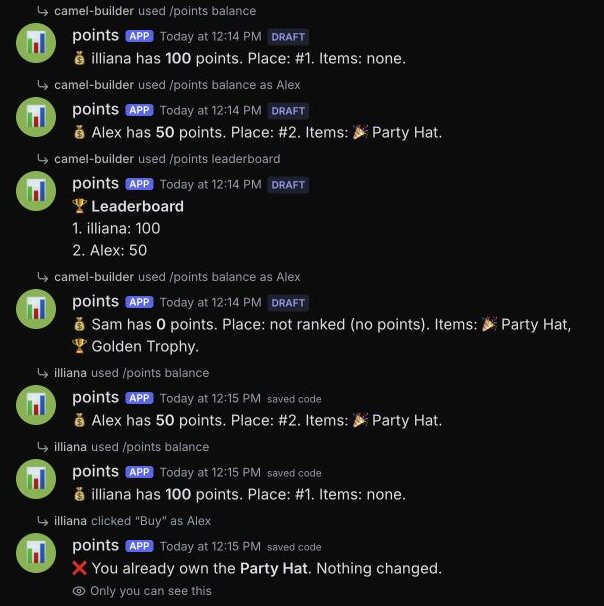
The next card said "Version 2 updates its code." After Publish v2, our balance in Discord read "50 points. Place: #1. Items: Party Hat.", and /points daily was still refused for that day.
Roll back: the code changes, the data stays
On the bot page's Versions tab, we selected Roll back on Version 1. camelBot published a new Version 3, "from version 1's code".
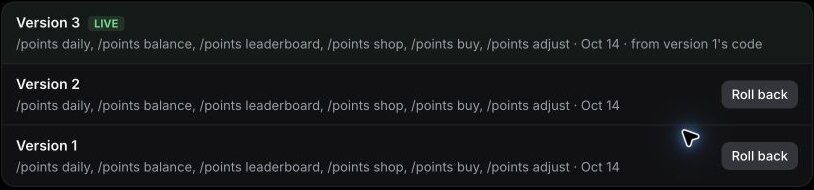
/points balance lost its place line but still showed 50 points and the Party Hat.
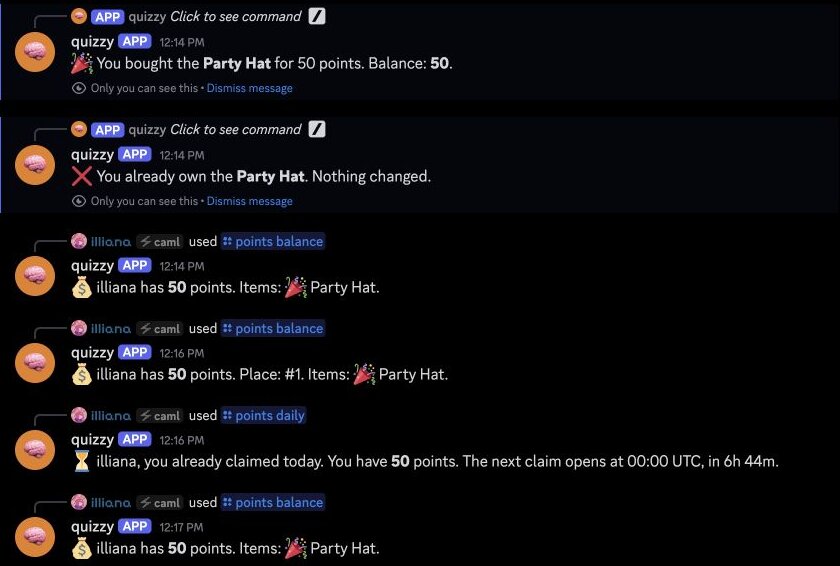
Publishing and rolling back change the code, never the saved data. A rollback won't refund purchases or take back points a faulty version gave out; fix those with /points adjust and a reason. Before big changes, Download its data in Settings saves a .sqlite copy. See the publishing docs.
Set up permissions in Discord
Expect only what every camelBot bot asks for: View Channel, Send Messages, Send Messages in Threads, Embed Links, Read Message History, Add Reactions, and Change Nickname on Camel's app. It never asks for Administrator; don't add it. We didn't see Discord's permission list (camel was already in our server). If you don't either, check the bot's role in Server Settings > Roles.
- Staff.
/points adjustchecks Manage Server. We checked this refusal in the private test channel. Our live checks used only the owner account and skipped/adjust, so check the refusal from your second account. - Channels. camel-builder reported only command and button handlers, so the bot doesn't read chat.
- Pausing. While it's live, anyone in its channels can claim and buy. Pause in Settings stops it without losing data.
Troubleshooting
/daily isn't in the slash menu. On Camel's app, type /points and pick daily.
A command says "The application did not respond". One of our /points daily replies did this. On the bot page, Activity showed 1 problem, "Failed on /points daily", with Discord's Unknown Webhook error (404, code 10015) under Details. Nothing was counted twice: the leaderboard showed 100, the saved data held one claim, and rerunning the command gave the right refusal. We haven't found the cause. Check the balance before correcting anything, and if it recurs, select Ask camel-builder to fix.
It's a new day, but the claim is refused. The day resets at 00:00 UTC, not local midnight.
Members can see /points adjust. Expected on Camel's app; camelBot refuses it for them. Your own app normally hides it.
A change works in the test channel but not in Discord. The status says Unpublished changes. Publish it.
Limits to know
| Limit | Value |
|---|---|
| Slash commands | 25 per bot; this one uses 6 |
| Choices in one option | 25, so /buy can offer up to 25 items |
| Saved data | 100 MB per bot |
The top 10 cap rests on camel-builder's report, since we had three members. The full list is in Permissions and limits.
FAQ
Do points from a Discord economy bot have real money value? No. Here they're a game score, and the bot takes no payments. Keep it that way: don't sell points or trade them for anything of real value.
Can a Discord daily reward bot reset at midnight in my time zone? Yes, as a fixed UTC time, such as 04:00 UTC for midnight in New York in summer. Daylight saving moves it an hour on local clocks, so keep the UTC time in the replies.
Do balances survive an update or a rollback? Yes. In our server, version 2 added a place line and the rollback removed it; the 50 points and Party Hat stayed.
Next steps
Start at bots.camelai.com with the prompt above, and add the shop once claims work. For a broader prompt with inventory and item admin commands, see the economy idea on our Discord bot builder page. camelBot is free while in beta, with no credit card. AI use in your bots draws on a daily allowance; camel-builder reported this one uses none.