Tips · Oct 28, 2026 · 11 min read
How to Make a Discord Event Bot with RSVPs and Reminders
This guide shows how to make a Discord event bot. An organizer posts an event card, members answer with Going, Maybe or Can't go buttons, and the bot reminds the people Going before it starts. Edit the event and the reminder moves; cancel it and the reminder is gone. You describe the bot to camel-builder, test it as pretend members in a private test channel, and add it to your server without writing code.
What a good Discord event bot does
An RSVP list is only useful if it's right: people who change their mind move instead of appearing twice, and a moved event doesn't remind anyone at the old time. A good Discord RSVP bot has:
- One answer per member. Another button moves you. The same button again changes nothing.
- Live counts and names. The card shows who's Going, Maybe and Can't go, and updates on every press.
- One start time for everyone. The organizer types the time in one zone, and the card shows a Discord timestamp, which Discord displays in each viewer's local time.
- A capacity with a waitlist. When Going is full, people wait in order, and the first moves up when a spot opens.
- A reminder that follows the event. It mentions the people Going. An edit moves it; a cancel removes it.
- Organizer-only changes. Only members with Manage Messages can create, edit or cancel.
- A cutoff. RSVPs close when the event starts.
This bot posts its own cards. It doesn't create Discord's own Scheduled Events, sync a calendar, take payments or send DMs. If Discord's built-in Events are enough, you don't need a bot; make one when you want your own rules.
What you need
- A Discord account, to sign in at bots.camelai.com.
- Manage Server in the server you'll add the bot to, and a channel for events.
- Organizers with Manage Messages. Moderators usually have it.
- A second Discord account without Manage Messages, to check the organizer rule and a live reminder.
- No credit card and no code. camelBot is free to start.
Step 1: Describe your event bot
Sign in. The first screen asks What should your bot do? Paste this:
Build an event RSVP bot. Its create, edit and cancel commands are for
organizers only: members with Manage Messages. create takes a title,
date (2026-10-24), time (19:30), time zone (like America/Chicago), an
optional capacity, and optional reminder minutes before the start
(default 30). Refuse past times and unknown time zones. It posts a
numbered event card in that channel with the title, the start as a
Discord timestamp, and Going, Maybe and Can't go buttons with live
counts and names. Each member has one response: another button moves
them, the same one changes nothing. At capacity, Going puts them on a
waitlist in order; when a Going spot opens, the first person waiting
moves up and is mentioned. A one-time reminder posts in the event's
channel and mentions everyone Going (skip it if that time has
passed). edit (event number, new date and time) moves the reminder
too. cancel marks the card Cancelled, turns off its buttons and
cancels the reminder. RSVPs close when the event starts.
The prompt spells out the rules that usually go wrong: a second press, who counts toward capacity, and which reminder survives an edit.
camel-builder writes the code, checks it, and tries each command while camel-builder is working… shows. Ours asked no questions and finished with Built event · checks passed. Its create takes title, date, time and timezone, plus optional capacity and reminder (minutes, default 30). edit takes event, date and time, with no time zone option, so an edited event keeps its own zone. camel-builder assumed the commands reply privately and that capacity is set only at create.
Step 2: Choose how it shows up in Discord
- Camel's app (marked Recommended): nothing to set up. Commands start with the bot's name: name it
event, and organizers use/event create,/event editand/event cancel. - Your own app: about 5 minutes on Discord's developer site, for the bot's own name, picture, and top-level commands such as
/create, which you may want to rename. Its token goes in camelBot's token field, never the chat.
Both support the same features, and you can switch later. We kept the suggested name event and its 📅 picture, left Use this name and picture in Discord off, and selected Create event.
Step 3: Test RSVPs, edits and reminders in the test channel
Every bot has a private test channel, here #try-event; nothing in it goes to Discord. The first button in the message box sets who you are: yourself (the owner), or Alex or Sam, pretend members with no permissions. You can also switch to #general. Mentions and timestamps show here as raw codes; Discord renders them.
Each reminder is an alarm, listed in the alarm clock in the channel header. In the test channel, only an alarm due within 15 minutes of being set goes off by itself, marked "goes off". Longer ones wait for Run now, so test reminders with events that start soon.
What camel-builder tried first
camel-builder's own tries refused an unknown time zone, a past date, 7pm instead of 19:30, a Chicago time skipped by daylight saving, a capacity of 0 (it takes 1 to 1,000) and a 99999-minute reminder (0 to 10,080). It also tried a waitlist, a cancel and a press after the start, and fired two reminders early itself.
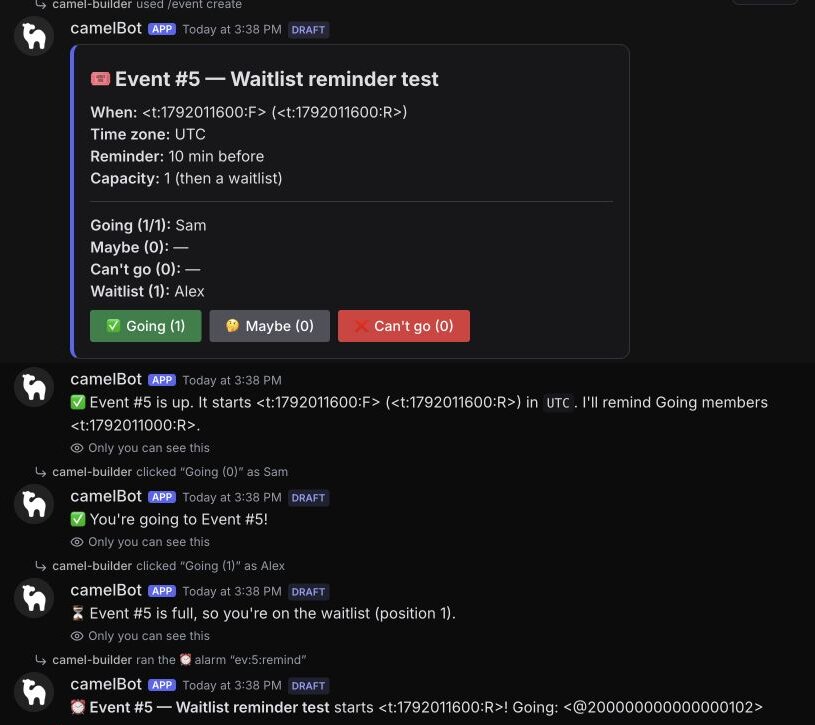
Those tries used the first five event numbers, so our run started at #6.
Responses and organizer rules
camel-builder ran these for us:
- As Alex, run
/event create. It shows under Your bot hit an error on: "Alex can't use /create: it needs Manage Messages." That's expected, not a bug. - As yourself, try a past date, then
timezone:Mars/Olympus. Both are refused privately. - In #general, run
/event createwith a title, tomorrow's date,time:19:30,timezone:America/Chicagoandreminder:10. Ours was "Tutorial board game night". - As Alex, press Going twice: "✅ You're going to Event #6!", then "You're already going to Event #6."
- As Sam, press Maybe. As Alex, press Can't go: Alex moves and appears once. Press Going yourself.
- As Alex, run
/event edit; as Sam,/event cancel. Both are refused, and the card doesn't change. - Look at test data in the ⋯ menu. Ours had one response row per member.
camel-builder also filled a capacity:1 event: the owner took the spot, and Alex and Sam got waitlist positions 1 and 2. Alex's second press kept position 1. When the owner switched to Maybe, the channel announced "🎟️ A spot opened for Event #7", mentioning only Alex, who moved up.
Change the code, keep the answers
We asked camel-builder for a small card change, adding lines asking it only to save:
add a line under the title on event cards: times show in your own time zone.
It finished with Updated event · checks passed. Then, as Sam, we pressed Going on the board game card from before the change. The same card showed the new line, with the owner and Sam Going and Alex on Can't go. In test data, only Sam's answer had changed.
Edit, cancel, then wait for the reminder
We ran these ourselves, on the saved code:
- Run
/event editwith the board game card's number, today's date and a time about 15 minutes away, in Chicago time. The reply: "✅ Event #6 now starts … Its reminder moved to …". The same card changed, and the clock showed "ev:6:remind alarm, goes off in 5 min" in place of "tomorrow". - Create a second event starting about 38 minutes away, with the default 30-minute reminder; its alarm showed as going off in 8 minutes. Press Going as Alex, then cancel it: "✅ Event #8 is cancelled: the card says so, its buttons are off and its reminder is cancelled." Its alarm left the clock, and a later
/event editgot "❌ Event #8 was cancelled, so it can't be moved." - Wait, without Run now. At the reminder time, the board game alarm went off by itself and posted in #general, the event's channel, mentioning the owner and Sam. Alex, on Can't go, wasn't mentioned. The cancelled event's old reminder time passed with no post; we checked 90 seconds after it.
- After the start time, as Alex in #general, press Going on the board game card. Alex was told privately "❌ Event #6 has started, so RSVPs are closed." The card changed to "🔒 RSVPs are closed — the event has started." with its buttons off and the same counts: 2 Going, 1 Can't go.
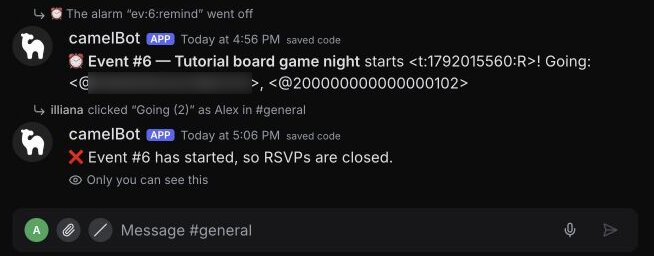
camel-builder reported no alarm at the start time, so a card closes on the first press after the start, not at the start itself.
camel-builder also ran past-time checks for us. An edit to a past date was refused, changing nothing. An event created to start in about 20 minutes, with the default 30-minute reminder, got "The reminder time has already passed, so there's no reminder." So did an event for tomorrow edited to start in 20 minutes, and its old alarm was removed.
If something fails, select Show details and tell camel-builder "fix that".
Step 4: Publish it and add it to your events channel
After camel-builder's first save, its chat showed Publish @event as version 1? camel-builder never publishes on its own. We used Add to Discord at the top of the test channel instead, picked the server and channel, and selected Add event to #camel-bots, which also publishes the saved code. Camel's app was already in our server, so no Discord permission screen appeared.
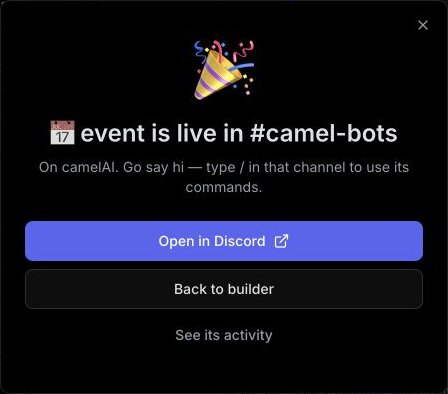
The bot page then showed Live in #camel-bots, Up to date and Activity "Nothing yet". Live data is kept apart from test data, so none of the test events came along.
Create events only in channels the bot is added to, since the reminder is a new post; add more from its Channels tab. Bots can't post in forum or voice channels.
Try a live event with a second account
We left ours installed and idle, with no event posted. To check yours in a quiet channel the bot is in:
- Run
/event createwithtitle:"Test only", today's date, a start about 20 minutes away, your own zone andreminder:10. Check that the card shows your local time. - From a second account without Manage Messages, press Going, and check that it can't run
/event editor/event cancel. - Wait for the reminder, which should mention only the members Going. Then cancel the event.
Every publish is a version you can roll back to; a rollback changes only the code, so saved events and responses stay.
Set up organizer permissions in Discord
- Check the permissions. camel-builder reported no extra capabilities, so expect View Channel, Send Messages, Send Messages in Threads, Embed Links, Read Message History and Add Reactions, plus Change Nickname on Camel's app. It gives no roles, so its role doesn't need moving. It never asks for Administrator; don't add it.
- Decide who organizes. All three commands require Manage Messages, so by default Discord hides them from members without it: the whole
/eventon Camel's app, each command on your own app. Server integration settings can change that, and the bot still refuses those members. Manage Messages also lets someone delete others' messages, so if your organizers aren't moderators, ask camel-builder for a different organizer rule. - Expect mentions. The reminder mentions each Going member, so Discord may notify them. camel-builder reported that it mentions the first 50 and adds "and N more" for the rest; we didn't test an event that large. It can't mention
@everyone,@hereor a role. - Know what it reads. camel-builder reported only command, button and alarm handlers, so the bot reads no ordinary messages.
Troubleshooting
| Symptom | Why | Fix |
|---|---|---|
/create isn't in the command menu | On Camel's app, commands start with the bot's name | Type /event and pick create |
| A test reminder never goes off | It was more than 15 minutes away when set | Select Run now, or edit the start closer to now |
| "The reminder time has already passed" | The lead is longer than the time left | Use a smaller reminder, or a later start |
| No reminder in Discord | The bot isn't in that channel, or it's paused | Add it to the channel, or resume it |
Limits to know
| What | Limit |
|---|---|
| Reminders waiting | 200 per bot, up to a year ahead. camel-builder reported no check for the year limit, and we didn't try one, so keep events within a year |
| Capacity and reminder lead | 1 to 1,000 people; 0 to 10,080 minutes (7 days) |
| Mentions per reminder | The first 50 people Going, then "and N more" (camel-builder's report; not tested at that size) |
| Names on the card | 40 per list, or 700 characters, then a count of the rest (camel-builder's report; not tested at that size) |
| Saved data | 100 MB per bot |
Schedules don't run while a bot is paused, so don't pause it before an event. The full list is in Permissions and limits.
FAQ
Does this Discord event bot use Discord's Scheduled Events? No. It posts its own card and keeps responses in its own database. It doesn't create or sync Discord's Scheduled Events or a calendar.
Can a Discord RSVP bot show times in each member's time zone? Yes. The bot posts the start as a Discord timestamp, which Discord shows in each viewer's local time: a 19:30 Chicago start reads 20:30 in New York.
Can members sign up through a form instead? Ask camel-builder for one: "when someone presses Going, open a form asking for their in-game name". A form holds up to 5 fields, a Discord event signup form with no booking service. We didn't test that version.
Can the bot DM people before the event? Not as built, and we didn't test DMs. The reminder mentions the members Going in the event's channel, so nobody needs DMs open.
Next steps
Start at bots.camelai.com with the prompt above. If members want reminders of their own, a Discord reminder bot does that; that guide is coming. The Discord giveaway bot uses the same button pattern. Our Discord bot builder page has more ideas. camelBot is free to start, with no credit card. AI use in your bots draws on a daily allowance.