Tips · Oct 24, 2026 · 11 min read
How to Make a Discord Reaction Roles Bot Without Writing Code
Discord reaction roles let members pick optional roles by reacting to one message: 🎮 for Games, 🎨 for Art, 📅 for Events. Removing the reaction drops the role. This guide shows how to make a Discord role bot that creates those three roles, posts the panel with its starter reactions, and ignores everything else. You describe it to camel-builder, try it privately with pretend members, and add it to your server without writing code.
What good Discord reaction roles get right
Interest roles are self-service: members opt in to a label, a ping group or a channel, and opt out without asking staff. A good panel:
- Maps one emoji to one role. The panel says what each reaction means.
- Starts with the reactions on it. Members click instead of hunting for the right emoji.
- Takes the role when the reaction goes. Nobody needs a moderator to drop an interest.
- Gives plain roles only. No permissions, and never @everyone or a role the bot didn't make.
- Ignores everything else. Other emoji, other messages and the bot's own starters change nothing.
- Keeps setup for staff. Posting the panel takes Manage Roles.
This is for optional interests, not access: anyone who can see the panel can react. For a rules check that opens the server, see the verification bot guide.
On a Community server, Discord's Onboarding can give roles from members' answers with no bot. Reactions can't get a private reply, so this bot answers in public when a change fails; for private confirmations, ask camel-builder for buttons.
What you need
- A Discord account, to sign in at bots.camelai.com.
- Manage Server to add the bot and Manage Roles to post the panel. The server owner has both.
- A channel for the panel, such as
#pick-roles. - A second Discord account that isn't the owner, to test as a regular member.
- No Server Members intent, no Message Content, no credit card and no code. camelBot is free while in beta.
Step 1: Describe the role panel to camel-builder
Sign in and answer What should your bot do? with this prompt:
Build a reaction roles bot for optional interests.
/panel (Manage Roles only, private replies) posts a panel where I
run it: 🎮 Games, 🎨 Art, 📅 Events. React to get a role; remove
the reaction to drop it. Add the 3 reactions yourself.
The first /panel makes those three roles, with no permissions and
not mentionable. Later runs reuse them and replace the old panel
(delete its message if it's still there). Save, per server, the
panel and which emoji gives which role.
A reaction on the current panel with one of those emoji gives its
role; removing it takes the role. Ignore anything else, and never
give @everyone or a role you didn't make. Stay silent when a change
works; repeats are fine. Name the interest in each change's reason.
If Discord refuses a change, reply under the panel: who, which
role, and that an admin must check my Manage Roles permission and
that my role is above these. If /panel can't make a role, tell me
what Discord said and post no panel.
The bot makes its own roles because it can see a role's name but not its permissions, so it couldn't tell whether a role you picked can ban people. It saves only the panel and the emoji map; Discord's role list records who picked what.
camel-builder writes the code, checks it, and tries each command while camel-builder is working… shows under the message box. Ours asked no questions and finished with Built roles · checks passed.
The follow-up that fixed the starter reactions
One line didn't come out as we meant it. "Add the 3 reactions yourself" was for the bot, but camel-builder read it as an instruction to us. Its first test panel came with the private reply "Add the three reactions to it yourself." and the bot added none. We caught it before publishing and sent a correction. The core, reworded without the code names:
In the original prompt "Add the 3 reactions yourself" meant the bot,
not the owner. On first setup, after posting the panel, save its ID
and seed 🎮, 🎨, 📅 on it. If seeding fails, preserve the existing
roles and panel and tell staff exactly what failed; do not silently
create replacement roles or panels. The private confirmation must not
tell the owner to do work that the bot was asked to do.
Our message also dropped a membership check before each role change, since Discord accepts repeats, and asked camel-builder to save without running tests. It finished with Updated roles · checks passed, reporting that the bot now adds the three reactions right after saving the panel. The lesson: say who does each thing. "The bot adds the 3 reactions itself" leaves no doubt.
Two follow-ups for a panel that stays up
Our demo panel stays up for members, so before that correction we asked camel-builder to keep the panel instead of replacing it. The core, trimmed:
Keep those roles permissionless and not mentionable. Say on the
panel that these roles are cosmetic and do not unlock channels.
If the saved panel exists, reuse it and privately return its link
instead of deleting/reposting it; preserve the same three role IDs.
If a saved role or panel is missing, report that to staff rather
than deleting anything or silently replacing roles.
Without it, a second /roles panel posts a new panel and deletes the old one, as camel-builder's first tries did. The last follow-up changed only wording: "Make future panel text say members can pick as many as they like." A panel that's already up keeps its text.
Step 2: Choose how the bot shows up in Discord
Start on Camel's app, marked Recommended, which needs no setup. Commands begin with the bot's name, so name it roles and select Create roles; the command reads /roles panel. Members without Manage Roles are refused, and since it's the bot's only command, Discord hides /roles from them by default, though server integration settings can change that.
Your own app takes about 5 minutes on Discord's developer site and gives the bot its own name, picture, command (/panel) and server role. On Camel's app, every camelBot bot in a server shares one role and one look, so its Manage Roles is shared too. You can switch later.
Step 3: Try reactions in the test channel
In the private test channel, #try-roles, nothing reaches Discord: role changes show as notes such as "Gave role Games to Alex (reason: Interest: Games)". The first button in the message box picks who you are: yourself (the server's owner), or Alex or Sam, pretend members with no permissions.
- As Alex, run
/roles panel. It's refused before the bot's code runs: "Discord refuses /panel for Alex: it needs Manage Roles, and Alex has no permissions in the test server." That's the permission check working, not a bug. - As yourself, run it. The first time, notes say the bot made Games, Art and Events, and the panel appears. camel-builder's first tries did this for us before the follow-ups, so our test panel kept the original wording.
- Run it again, in the same channel and then in #general. Both times ours replied privately "The interest-roles panel is already up" with a link to the same panel, and "I changed nothing." No roles were made and nothing was deleted.
The message box can't add reactions, so ask camel-builder to react as Alex and Sam:
In the test channel, run these on the current panel one at a time
and show me each result: Alex adds 🎮. Sam adds 🎨. Alex adds 🎮
again. Alex removes 🎮. Alex removes 🎮 again. Sam adds 👍.
Ours was longer and named the panel's message. camel-builder ran these for us:
- Alex's
🎮gave Games, with the reason "Interest: Games". Sam's🎨gave Art. - Alex's second
🎮showed the same note again, with no error or message. In Discord, giving someone a role they already have changes nothing. - Removing
🎮took Games ("No longer interested: Games"), and the repeat removal did the same, silently. - Sam's
👍did nothing.
In its other runs, 🎮 on the bot's private reply and 📅 on the old, deleted panel did nothing, while 📅 on the current panel gave Events. Look at test data in the ⋯ menu showed one row in interest_panels and three in interest_roles (emoji, role and name), with the same ids after every run and code change, and nothing about members. It works when:
- Alex and Sam can't post a panel.
- Each emoji gives and takes its own role, for each member.
- Unknown emoji and other messages change nothing.
- A second
/roles panelreturns the same panel and roles.
Role order, Discord's refusals and real members' roles only show in a real server.
Step 4: Publish it and add it to your server
The chat's card asks Publish @roles as version 1? and says the bot asks Discord "to let it give, take and make roles" (Manage Roles) and to "see reactions in its channels and on its messages". Select Publish v1, then Add to a channel when the chat asks @roles is published. Add it to a channel?
If Camel's app isn't in your server yet, Discord's own screen opens in a new tab to pick the server. Check that it lists Manage Roles beside the basic permissions, and approve. The bot never asks for Administrator; don't add it. Camel's app was already in ours, so we didn't check that list: we picked the channel in Pick a channel for roles and selected Add roles to #camel-bots.
Set up roles and the panel in Discord
Post the panel and check the roles
Run /roles panel in the panel channel. Ours replied privately: "Made the Games, Art and Events roles (cosmetic: no permissions, not mentionable) and added the 🎮 🎨 📅 reactions to the panel." The panel went up with each starter at 1.
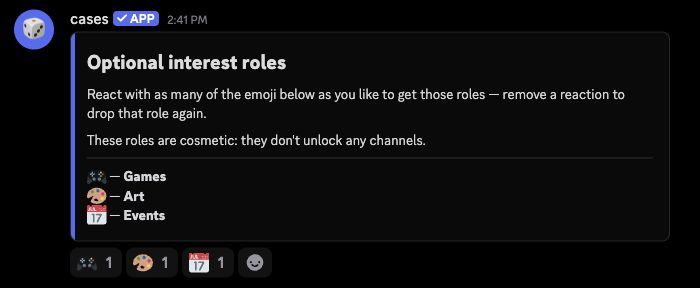
It shows cases, the bot from our moderation tutorial, because Camel's-app bots in a server share one name and picture. On your own app, the bot shows its own.
In Server Settings > Roles, Discord put Games, Art and Events at the bottom, below the shared app's role, which had Manage Roles and not Administrator. Each had every permission off, Allow anyone to @mention this role off and 0 members, with no entries in the channel's permissions. A bot gives only roles below its own, so leave them there; it doesn't need the top spot.
Keep the three permissionless: the bot can't see permissions, so anything you add, anyone can take from the panel. To make an interest open a channel, allow View Channel for its role there. Ours open nothing, and the panel says so.
Try it from your own account
React with 🎮 and check your profile. When we tried this as the owner, the count went to 2, Games appeared in our roles, and the bot page's Activity listed the reaction as worked. Removing it dropped Games and set the count back to 1. The bot gives each change a reason, such as "Interest: Games", for Discord's audit log.
Two misses, 👍 on the panel and 🎮 on an ordinary message of ours in the same channel, gave no role. With Show what it didn't respond to on, Activity listed both as "Saw a reaction, didn't respond". The three starters didn't appear there at all.
A second /roles panel replied privately that the panel is already up, and the original panel stayed, with its three reactions. We removed our test reactions and left the panel up for our members.
Check it with a second account
We tested only as the owner, who can do more than members. From a second account:
- React with
🎨and📅. Art and Events should appear on its profile, and your roles shouldn't change. We didn't try Art or Events in Discord. - Remove one. Only that role should go.
- Type
/roles. It shouldn't be offered, or should be refused.
To stop new emoji on the panel, deny @everyone Add Reactions in the channel's permissions. Discord still lets members click reactions already there. Allow Send Messages and Add Reactions for the bot's role, so it can seed a panel and reply when a change fails. The owner bypasses channel permissions, so check from the second account.
Check the failure reply
In a test server, remove your reaction, drag Games above the bot's role, and react again. camel-builder reported that the code then replies under the panel with the member's mention, the role and Discord's reason, ending "An admin: please check that I have Manage Roles, and that my role is above the interest roles." Anyone reacting meanwhile gets that public reply, so drag Games back quickly. We didn't run this on our demo, which members use.
Troubleshooting
Reacting does nothing. The emoji isn't one of the three, the message isn't the saved panel, the bot isn't in that channel, the change isn't published, or the bot is paused. A paused bot doesn't catch up on reactions made meanwhile.
The bot said it couldn't give a role. Its role is below that interest role, or it lacks Manage Roles. The reply names both even when the cause is different, such as the rate limit or a deleted role, so read Discord's reason too. After a fix, the member removes and re-adds the reaction.
/roles panel says a role is missing. Someone deleted one. camel-builder reported that the bot then reports it and changes nothing, without making replacements. Tell camel-builder how to rebuild it.
The panel was deleted, but /roles panel still links to it. The bot can't see whether its panel still exists. Don't delete it; if it's gone, ask camel-builder for a change that posts a new one.
A reaction and a role don't match. A change failed, the bot was paused, a moderator cleared the panel's reactions (the bot isn't told, so roles stay), or the member left and rejoined (Discord drops roles on leaving). Removing and re-adding the reaction fixes it.
Limits to know
| Limit | Value |
|---|---|
| Role changes (giving, taking, making) | 30 per minute per bot |
| Roles the bot makes | 50 per server, not counting deleted ones |
| Roles it can give | Below its highest role; never @everyone |
| Reactions it hears | In its channels and on its own messages |
If many people react at once, changes past the limit fail; members can react again a minute later. The full list is in Permissions and limits.
FAQ
Can Discord reaction roles use roles I already have?
Yes, with a change: ask camel-builder to have /roles panel take a role for each emoji. The bot can refuse @everyone but can't see a role's permissions, so check that each role has none and sits below the bot's.
Can members pick only one role, like a color? Not well with reactions. This bot doesn't remove reactions, so taking one role when a member picks another would leave a stale reaction on the panel. A select menu that allows one choice fits better.
Do reaction roles work on Camel's app without the Server Members intent? Yes. Reactions aren't member events, so the bot needs neither Server Members nor Message Content. Ours runs on Camel's app.
Next steps
Once the panel works, a welcome bot can point new members to it, and the verification bot covers the required role that opens a server. For more ideas, see how to make a self-service Discord role bot and other bots on our builder page. camelBot is free while in beta, with no credit card. AI use in your bots draws on a daily allowance, and this one uses none.