Tips · Oct 16, 2026 · 10 min read
How to Build a Discord Moderation Bot with Staff Review

This guide shows how to build a Discord moderation bot that flags messages breaking your rules and posts each one to a private staff channel as a numbered case. A moderator presses Dismiss or Timeout, and the bot saves the decision, the moderator, and the reason. You describe the bot to camel-builder, test it privately, and add it to your server, without writing code.
What a good Discord moderation bot does
A good Discord moderation workflow lets the bot do the noticing and leaves the judgment to people, with a record of who decided what, and why.
- Rules you can test. This bot flags Discord invite links and the phrases "free nitro" and "steam gift".
- One case per message. A message that breaks two rules is one case that lists both.
- A person decides. A moderator presses Dismiss or Timeout and gives a reason.
- Only staff, only once. Presses from anyone off the staff list are refused, and the first decision closes the case.
- A history.
/cases historylists a member's past cases, so repeat offenders stand out.
This example can't delete the flagged message. A moderator removes it from the link in the case.
Why a person makes the call
"I got a Steam gift card for my birthday" contains "steam gift". A warning about free nitro scams contains "free nitro". These false positives match a rule without breaking it, and a moderator spots them at a glance. Start with a short list, and narrow any rule that's dismissed more often than it's upheld.
Where Discord's AutoMod fits
Discord's built-in AutoMod can block a message before it appears, so use it for what's never acceptable. This custom Discord bot reviews messages after they're posted, for rules where context matters.
What you need
- A Discord account to sign in at bots.camelai.com.
- Manage Server in your server, and the ability to edit roles and channel permissions.
- A private staff channel, such as
#mod-cases, separate from the channels the bot watches. - A second Discord account to play the member in the real-server checks.
- Optional: your own Discord app, about 5 minutes on Discord's developer site.
- No credit card or code. camelBot is free while in beta.
Step 1: Describe the review workflow
The first screen asks What should your bot do? Paste this:
Build a moderation bot where staff review flagged messages.
/setup channel (Manage Server only) saves our private staff channel
and adds me to the staff list; /staff-add and /staff-remove (also
Manage Server) edit it. Flag messages with a Discord invite link
(discord.gg/ or discord.com/invite/) or "free nitro" or "steam gift",
except from staff or in the staff channel. Don't reply to flagged
messages. Each flagged message is one numbered case, posted to the
staff channel with the member, rule, text, message link, and Dismiss
and Timeout buttons. Both open a form asking for a reason; Timeout
also offers 10 minutes, 1 hour or 1 day. Only listed staff can
decide, once per case. Time out only the case's member, with the
case number and moderator in the reason. Save the decision,
moderator, reason and time; update the staff post. If Discord
refuses, say why and keep the case open. /history member (Timeout
Members only) lists their cases.
A slash command can require a Discord permission, but a button can't, so the bot keeps its own staff list and checks it on every press. It takes the member to time out from the saved case, so a timeout lands only on the poster. Keep the list to your moderators.
camel-builder writes the code, checks it, and tries each command while camel-builder is working… shows under the message box. Ours replied "cases is built and saved. It isn't released yet."
The follow-up we needed
In our first test, "Join my server discord.gg/abc123 for free nitro" made one case, as asked, but listed only Discord invite link. This follow-up fixed it:
The combined test message "Join my server discord.gg/abc123 for
free nitro" makes one case, but its Rule field only lists Discord
invite link. Keep one case per message and list every rule the
message matched in that case, including free nitro. Update history
to show all matched rules too. Save the fix, do not publish.
The field now reads Rules when several match. The case made before the fix kept its single rule: a fix changes code, not saved cases. So after any fix, choose Reset test data in ⋯ and test again from the top. Name the message and field that's wrong, and say what must stay the same.
Step 2: Choose Camel's app or your own app
- Camel's app (Recommended) is ready now. Commands start with the bot's name, like
/cases setup, and it sees every message in the channels you add it to. - Your own app takes about 5 minutes on Discord's developer site. Commands look like
/setup, it needs Message Content (its Settings offer to turn it on), and its token goes in camelBot's token field, never the chat.
Start on Camel's app. For long-term moderation, consider your own app: on Camel's app, every camelBot bot in a server is one Discord member, camel, sharing one role, one look, and one audit-log identity. camelBot suggests a name; change it to cases and select Create cases.
Step 3: Test flags, refusals, and timeouts
Your bot's private test channel, #try-cases, sits beside the chat, and nothing in it goes to Discord. The first button in the message box picks who's talking (you, or Alex and Sam, pretend members without permissions) and where (the bot's channel or #general, the stand-in staff channel). You count as the server owner. camel-builder can also run steps for you.
- As yourself, run
/cases setup channel:generaland/cases staff-add member:sam. Setup's private reply says "you're on the staff list." - As Alex, run
/cases staff-add member:alex. Your bot hit an error on shows "it needs Manage Server": the test channel's permission check, not a bug. - As Alex in
#try-cases, say "Anyone up for a game tonight?" Nothing happens. Ignore any note that the bot only notices messages addressed to it. - As Alex, say "Join my server discord.gg/abc123 for free nitro". No reply, and Case #1 appears in #general with the member, Rules (Discord invite link, Free nitro), the text, a link, Dismiss and Timeout.
- Post an invite as Sam in
#try-cases, then as Alex in#general. No case: staff and the staff channel are skipped. - Switch back to
#try-casesas Alex and say "Careful, the free nitro DMs going around are a scam". That's Case #2, a deliberate false positive. - As Alex in #general, submit Timeout on Case #1 and Dismiss on Case #2. Both are refused: "Only members on the staff list can decide cases."
- As Sam, Dismiss Case #2, reason "Warning others about the scam, not spam". The post shows Dismissed, Sam, the reason, and Closed.
- As yourself, Timeout Case #1 for 10 minutes, reason "Advertising another server". A note shows it instead of doing it: Alex only, reason
Case #1 by {your name}: Advertising another server, marked "(a preview changes nothing in Discord)". - Decided posts lost their buttons in our test, so ask camel-builder to resubmit case 1's Timeout form as Sam. The reply: "Case #1 has already been decided." It doesn't say who decided.
- As yourself, run
/cases history member:alex. It shows each case's rules, decision, length, date, reason, and message link, but not the moderator. Try it as Alex: "it needs Timeout Members". - As yourself, run
/cases staff-remove member:sam. Switch to Alex in#try-casesand say "free nitro for everyone". It becomes Case #3, which Sam can no longer decide. - Tell camel-builder: "Also flag the phrase 'nitro giveaway'." Once saved, Alex's "nitro giveaway tonight" in
#try-casesbecomes Case #4.
In ⋯, Look at test data shows what the bot saved. After the rule change, ours still had cases 1 and 2 closed with decision, moderator, reason, and time (600 seconds for the timeout), 3 and 4 open, and only the owner on staff.
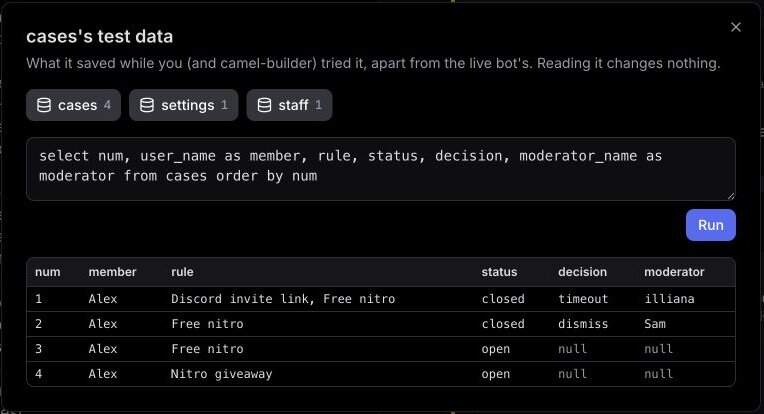
Saved data, the staff list, and command permissions are real here; timeouts, role hierarchy, and channel privacy aren't. It's working when a normal message makes no case, a two-rule message makes one, Alex can't act, and the only timeout note names Alex.
Step 4: Publish it and add it to your channels
- A card asks Publish @cases as version 1? and lists Kick Members, Ban Members, Timeout Members and Manage Nicknames. camel-builder's summary mentioned only Moderate Members (Timeout Members), so go by the card. Select Publish v1; camel-builder never publishes on its own.
- Select Add to Discord, pick your server and a channel to watch, such as
#general, and approve. - Set up
#mod-cases(next section), then add the bot there with/camel addor its Channels tab. - Run
/cases setup channel:#mod-cases, then/cases staff-addfor each moderator.
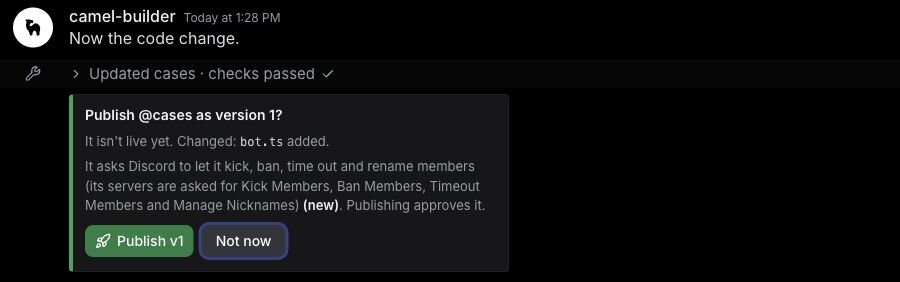
The bot skips its staff channel and its staff, including you after setup, so test flagging from another account in a watched channel.
When we tried this in our server, /cases setup and /cases history answered privately, and history said No cases for {name}. The replies showed another bot's name: on Camel's app, a server's bots share one look.
Check it in real Discord
We didn't run a real timeout. With your second account, post an invite in a watched channel, then time that account out from its case. Only that member should be timed out, and in Server Settings > Audit Log the reason should read Case #N by {moderator}: {reason}. Remove the timeout afterwards.
Set up permissions, roles, and the staff channel
- Read the permission list. Every bot asks for View Channel, Send Messages, Send Messages in Threads, Embed Links, Read Message History and Add Reactions, plus Change Nickname on Camel's app. Moderation adds Kick Members, Ban Members, Timeout Members and Manage Nicknames as a set; this bot only times people out. Never add Administrator. Where camel was already in the server, we saw no new permission list, so check the role afterwards.
- Place the bot's role. In Server Settings > Roles, drag it above member roles and below moderator and admin roles. Discord lets it time out only members whose highest role is below its own, never the owner or an Administrator.
- Make the staff channel private. In
#mod-cases, turn View Channel off for@everyone, and allow View Channel, Send Messages, Embed Links, and Read Message History for moderators and the bot. Your second account shouldn't see it. - Know who sees the commands.
setup,staff-addandstaff-removeneed Manage Server;historyneeds Timeout Members. On Camel's app those share no permission, so/casesand all four stay visible to everyone by default, and the bot refuses anyone lacking the permission. Your own app can hide each command separately. Check with your second account. - Match the audit log. The log names the bot as the actor, so the reason carries the case number and moderator.
Troubleshooting refused timeouts and missing cases
A timeout fails. Discord refuses when the bot's role isn't above the member's, the member is the owner or an Administrator, or Timeout Members is missing. The bot was built to tell the moderator why and keep the case open, but the test channel can't produce a refusal, so we haven't seen that reply. Move the role or restore the permission, never add Administrator, and check Details in the bot page's Activity.
To reproduce both causes, use a test server: turn off Timeout Members on the bot's role, then give a test member a role above it, pressing Timeout each time. On Camel's app, all your camelBot bots there share that role.
A message that should be flagged makes no case. Setup hasn't run, the bot isn't in that channel, it's the staff channel, or the poster is staff (including you). Bot and webhook messages are ignored. On your own app, turn Message Content on.
Cases don't reach the staff channel. The bot isn't added to #mod-cases, or can't post there.
A moderator sees "Only members on the staff list can decide cases." Add them with /cases staff-add.
Limits to know
| Limit | Value |
|---|---|
| Moderation actions | 30 per minute per bot |
| Timeouts | Up to 28 days |
| Bot database | 100 MB |
See Permissions and limits for the rest.
FAQ
Can a Discord moderation bot delete messages? This tutorial's bot doesn't delete messages. A moderator removes a flagged message from its link in the case. To stop a message before anyone sees it, use AutoMod.
Can I add a Discord timeout command too?
Yes. Ask camel-builder for "a timeout command with member, length and reason, for Timeout Members only, saved as a case." On Camel's app it becomes another /cases subcommand, under the same role rules.
Next steps
When you want more, build your own Discord moderation workflow around the rules your server already has. The Discord ticket bot guide uses a similar staff-only button pattern, and how to make a Discord bot covers first-bot basics. camelBot is free while in beta, with no credit card. AI use in bots draws on a daily allowance; this bot's rules use none, though building and testing it uses your camel-builder allowance.