Tips · Oct 20, 2026 · 9 min read
How to Make an Opt-In Discord Birthday Bot Without Code

This guide shows how to make a Discord birthday bot that members opt into. Each member saves a month, day and time zone, and the bot posts one wish in your birthday channel on the day. You describe it to camel-builder, test it with made-up dates in a private test channel, then add it to your server. No code, and no birth years.
What a good Discord birthday bot does
A birthday bot gets noticed when it's wrong: a wish a day early, the same wish twice, or a date someone never meant to share.
- Opt-in only. Nobody is listed until they add themselves.
- Month and day, never the year. It can't reveal anyone's age.
- The member's own time zone. "Today" means today where they live.
- One wish a year. A second run that day posts nothing.
- Easy to leave.
announce:falsekeeps you off the list, and/birthday removedeletes your birthday entry. - Staff pick the channel. Setup needs Manage Server.
| Situation | What the bot does | Tested |
|---|---|---|
| Impossible date or unknown time zone | Refuses, saves nothing | Test channel |
| A February 29 birthday | February 28 in other years | Test channel |
/birthday set again | Replaces the entry, keeps the year it last wished you | Test channel |
announce:false | Keeps the entry, excludes it from wishes | Test channel; live /check only |
/birthday remove | Deletes your birthday entry | Test channel, our server |
| No birthday channel | Posts nothing, marks nobody | Test channel |
| Two runs in one day | The second posts nothing | Test channel |
| A late run or a paused day | Belated wishes for yesterday only | Not tested |
Its birthdays table holds month, day, tz, announce and announced_year, the year it last wished someone, per member and server; settings holds each server's channel. No birth year, age or name. Replies are private, and as the owner you can save everything with Download its data, so tell members.
What you need
- A Discord account, to sign in at bots.camelai.com.
- Manage Server in the server you'll add it to.
- No Server Members intent or Message Content: members add themselves.
- No credit card and no code. camelBot is free while in beta.
Step 1: Describe the birthday bot to camel-builder
Answer What should your bot do? with this prompt:
Build an opt-in birthday bot. Never ask for a birth year.
/set takes month (January to December, saved as 1-12), day,
timezone (an IANA name like Europe/London) and announce (true or
false). Refuse impossible dates and unknown time zones. Setting
again replaces the member's entry. /show and /remove show or
delete your own entry. All replies are private. /setup (Manage
Server only) makes the channel it's run in the birthday channel.
Every day at 12:00 UTC, using each member's own time zone, post
one message there mentioning each member with announce on whose
birthday is today, plus belated wishes for yesterday's not yet
announced. Feb 29 counts as Feb 28 in non-leap years. Save the
year each member was announced: never announce anyone twice in a
year, even if the schedule runs twice. Edits keep that year;
/remove deletes everything. With no channel or a failed post, mark
no one. /check date:YYYY-MM-DD (Manage Server only) privately
lists whose birthdays that date would celebrate.
Every rule is spelled out because camel-builder fills gaps with its own defaults. Time zones are typed IANA names such as Asia/Tokyo, since Discord allows only 25 choices per option.
camel-builder writes, checks and tries the code while camel-builder is working… shows. Ours asked no questions and finished with Built birthday · checks passed. It added that "the year is saved only after a post succeeds" and that a wish for more than 40 members is "split into several posts". We tested neither.
Step 3 uses this follow-up:
change the birthday message to say Happy birthday from all of us
Step 2: Choose how it shows up in Discord
On Camel's app, marked Recommended, name the bot birthday and select Create birthday. Commands then read /birthday set, /birthday show and /birthday remove, plus setup and check for staff. Every Camel's-app bot in a server shares one name and picture.
Your own app takes about 5 minutes on Discord's developer site and gives the bot its own name and top-level commands, so ask camel-builder to rename the vague /set. Its token goes in camelBot's token field, never the chat.
Step 3: Test birthdays with Run now
In the private test channel, #try-birthday, you talk as yourself (the server owner) or as Alex and Sam, pretend members with no permissions. The schedule runs only when you select Run now next to daily (cron 0 12 * * *) under the header's alarm clock. Run now uses the real current time; it doesn't simulate another day.
Pick test dates. Pacific/Kiritimati (UTC+14) and Pacific/Pago_Pago (UTC-11) are never on the same date. "Today" below is today in Kiritimati: when we ran this, it was October 14 there and October 13 in Pago Pago. Avoid 10:00 UTC, when Kiritimati's date changes. Start with Reset test data in the ⋯ menu, and type the month as a number (month:2); Discord shows month names.
- Refusals. As Alex,
/birthday set month:2 day:30 timezone:Pacific/Kiritimati announce:truereplies privately "February doesn't have a day 30. Nothing was saved." April 31 is refused the same way, andtimezone:Mars/Olympusgets "I don't know that time zone. Use an IANA name like Europe/London or America/New_York." - Staff only. Alex's
/birthday setupis refused under Your bot hit an error on: "Alex can't use /setup: it needs Manage Server." That's the rule working, not a bug. - An edit. As Alex, set March 3, then today.
/birthday showlists only today, with "Last announced: never". - Another zone. As Sam, set today with
timezone:Pacific/Pago_Pago, where it hasn't arrived. - A removal. As yourself, set today, then run
/birthday remove: "Your birthday and everything saved with it is deleted." - No channel. Run now posts nothing.
- Setup, then two runs. As yourself in #general, run
/birthday setup. Run now posts one "Happy birthday" mentioning Alex only, since Sam's date hasn't arrived and yours is gone. Run it again: nothing. - Check the data. Look at test data in the ⋯ menu shows this year in Alex's
announced_year, and Sam's still empty.
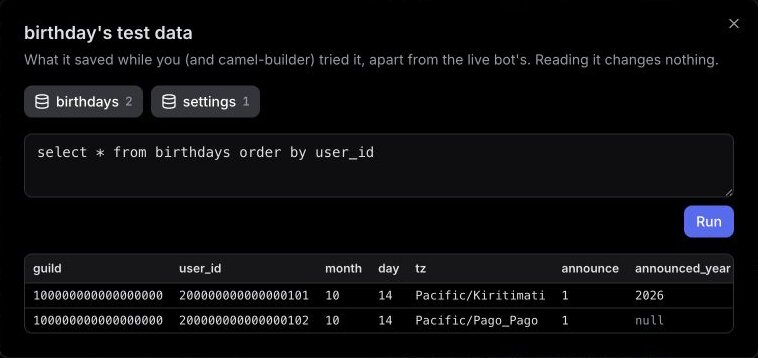
- Opt-out and belated. As Sam, set today in Kiritimati with
announce:false("I won't announce it."). As yourself, set yesterday. Run now posts "Belated birthday wishes to" you alone. Switch Sam toannounce:true: the next run wishes Sam only, and the one after posts nothing. - Change the wording. Send the follow-up from Step 1 and wait for Updated birthday · checks passed. Alex's
/birthday showstill said "Last announced: 2026", and Run now posted nothing.
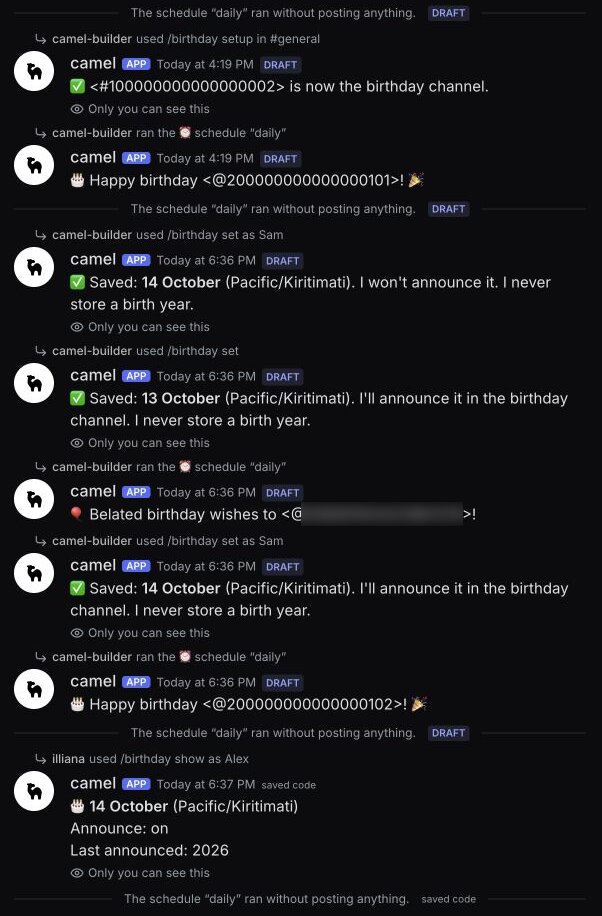
- Leap day. As Sam, set
month:2 day:29. As yourself,/birthday checklists Sam fordate:2027-02-28anddate:2028-02-29, and replies "Nobody with announcements on would be celebrated" for2027-03-01and2028-02-28.2027-02-29is refused: "Use a real date as YYYY-MM-DD". Alex's check is refused like setup.
camel-builder ran steps 1 to 9 and 11 for us. We ran step 10's checks by hand, which runs the saved code (labeled saved code). Nobody was due then, so the new wording hasn't appeared in a wish. Afterwards, test data still held all three entries, last announced in 2026, with only Sam's date changed. Mentions show as raw codes here.
It's working when bad dates are refused, wishes follow each member's zone, two runs give one wish, and opt-out, removal and the staff checks hold.
Step 4: Publish it and pick the birthday channel
After a save, our chat showed Publish @birthday as version 1? It listed the commands members would get and no extra permissions. We selected Publish v1; camel-builder never publishes on its own.
We then selected Add to Discord from @birthday is published. Add it to Discord? The bot became live in our server's #camel-bots channel. Until a bot has a channel, its page says it "isn't in a Discord channel yet, so nobody can use it."
You can also select Add to Discord in the test channel. Pick your server and channel, then confirm. For an unpublished bot, that confirmation publishes its saved code and adds it. If the app is already in your server, you may not see another Discord authorization screen.
Run /birthday setup in that channel, and tell members it's opt-in and what it stores. Rolling back to an earlier version changes only the code, so saved birthdays stay.
What we checked in our server
In our server, we tested as the owner with a made-up date, April 15 in UTC. /birthday show started empty, since test data doesn't carry over. After setup, /birthday set saved it ("I never store a birth year."), and /birthday check date:2027-04-15 listed us.
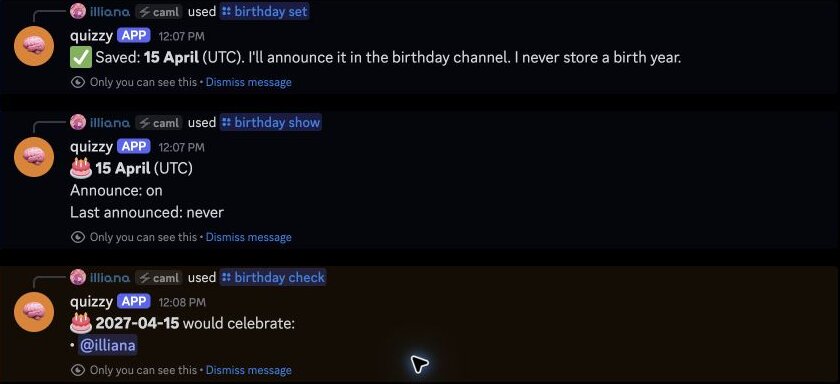
With announce:false, /birthday show said "Announce: off" and the check found nobody. /birthday remove deleted the entry, and /birthday show confirmed it.
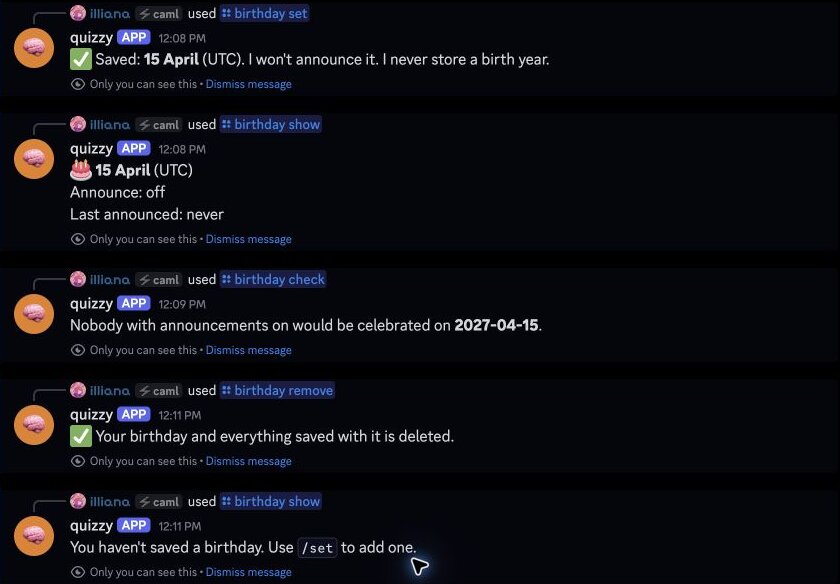
Every reply was marked Only you can see this and showed as quizzy, from our first tutorial, because quizzy was added to our server first. We then paused the bot; no birthday rows remained, and the channel setting was retained.
What we didn't see: a wish in Discord, a 12:00 UTC run, the next day, a missed day, or another member. Each run is designed to cover today and yesterday, and camelBot runs a missed schedule once when it's back. To check the rest:
- Before 12:00 UTC, set today's UTC date with
timezone:UTC announce:true. At 12:00 UTC one message should mention you, and the next day's run nothing. Then remove it. - From an account without Manage Server, confirm only it sees its replies and its
/birthday setupis refused. - Mention notifications depend on Discord settings; we didn't test them.
Permissions for a birthday bot
Discord's screen should ask for View Channel, Send Messages, Send Messages in Threads, Embed Links, Read Message History, Add Reactions and, on Camel's app, Change Nickname. Never Administrator. We didn't check that list in our run. The bot acts on no members or roles, so there's no role to move.
setup and check need Manage Server. On Camel's app, /birthday also holds commands everyone can use, so members normally still see those two, and camelBot refuses them. Your own app normally hides them. The bot posts only in its channels and can't mention @everyone, @here or a role.
Troubleshooting
No wish on someone's birthday. No channel is set, the bot is paused, their announce is off, or /birthday show already lists this year. Activity on the bot's page shows failures.
Wrong day or an odd hour. The stored zone decides the day, so have them check /birthday show. 12:00 UTC is 07:00 or 08:00 in New York and 22:00 or 23:00 in Sydney; ask camel-builder for another hour if needed.
Month 13 says "That month doesn't have a day 1." That was the bot's reply to month:13 in the test channel, which accepts any number. Nothing was saved, but the reason is wrong. Discord's month list stops at December; to fix the wording anyway, ask camel-builder: "When the month isn't 1 to 12, say there's no such month." We didn't run this change.
/birthday set isn't listed. On Camel's app, type /birthday first.
Wishes never appear after setup. Run setup in a channel the bot was added to, or add that channel with Add a channel on its Channels tab. Details in Activity shows the error.
Limits to know
| Limit | Value |
|---|---|
| Repeating schedules | 25 per bot, at most once a minute |
| Missed schedules | Run when camelBot is back, once for all missed times |
| Paused bot | Runs no schedules |
| Saved data | 100 MB per bot |
The full list is in Permissions and limits.
FAQ
Can a Discord birthday bot read birthdays from members' accounts?
No. A bot can't see a member's date of birth, so members add their own with /birthday set. That's also what makes it opt-in.
Can the bot send a Discord birthday message by DM? Not as built: wishes go in the birthday channel, so nobody needs DMs open. DMs would turn on the messages capability, which asks your server for Manage Messages, and Discord refuses a DM to anyone who turned off DMs from server members or blocked the app.
Next steps
Grow the bot the way you built it: describe a change, test it, publish. To greet newcomers too, see the welcome bot guide. Our Discord bot builder page has more ideas. camelBot is free while in beta, with no credit card. AI use in your bots draws on a daily allowance; this one uses none.