Product · Nov 23, 2026 · 13 min read
7 Best Discord Bot Makers for 2027 (Free & Paid)
TL;DR: Our seven picks for the best Discord bot makers for 2027 are camelBot by camelAI, VibeBot, Kite, Bot Designer for Discord, BotGhost, inventor.bot, and SCNX. We recommend camelBot for people who want to describe a custom bot in plain English, try it privately, and have it hosted for them. Kite is a strong choice for free visual building, Bot Designer for Discord suits mobile creators, and BotGhost suits servers that want ready-made modules alongside custom commands.
A welcome message is easy to picture. A ticket system that follows your staff workflow, or a game that remembers everyone's score, takes more planning. The right Discord bot maker helps you turn that idea into something your members can actually use.
This guide compares seven tools for building custom Discord bots, including AI builders, visual editors, and a mobile app.
The Shortlist
| Best for | Pick | Why it stands out |
|---|---|---|
| Custom bots built through conversation | camelBot by camelAI | AI building, private testing, and managed hosting |
| AI generation with bot templates | VibeBot | Generates Discord.js code and offers a template library |
| Free visual bot building | Kite | Hosted visual flows with an open-source platform |
| Building from your phone | Bot Designer for Discord | Mobile apps, command templates, and BDScript editing |
| Ready-made modules and custom commands | BotGhost | Built-in community features plus a visual command builder |
| Visual projects with databases and debugging | inventor.bot | Flows, built-in databases, traces, and logs |
| A branded community management bot | SCNX | Configurable modules and custom command workflows |
How We Evaluated These Tools
We compared the vendors' published features, documentation, pricing, and free-plan limits as of November 23, 2026. camelAI makes camelBot. The camelBot section includes results from a trivia bot we built and tested. Our recommendations for the other six builders are based on their published documentation and plan details.
The questions that matter most when choosing a builder are:
-
How do you build? Can you describe the bot to AI, connect visual blocks, or edit scripts?
-
What can you customize? Can you change the workflow beyond a preset welcome message or moderation rule?
-
Who keeps it running? Is hosting included, and does the free plan require activity or check-ins?
-
Can it remember things? Scores, balances, ticket status, and settings need persistent storage.
-
How do you make changes? Look for testing, error logs, and ways to recover from mistakes.
-
What does free include? Separate an ongoing free plan from a trial, and check both building limits and running costs.
What to Look for in a Discord Bot Maker
Start with one workflow you want to improve. For example: “A member opens a ticket, staff claim it, and the bot remembers its status.” Use that same workflow when comparing builders.
Choose a building style you will enjoy using. An AI builder lets you explain the behavior conversationally. A visual editor makes you responsible for connecting each step. A scripting editor gives you another way to express the logic, with more syntax to learn.
Look beyond the first reply. Your bot may need buttons, forms, permission checks, saved information, and different behavior for staff and members. Write those requirements down before choosing a tool.
Budget for operation as well as creation. A bot might be hosted for free while consuming action credits or AI allowances. Other free plans need hosting-time top-ups or periodic check-ins. Check what happens when an allowance runs out.
Plan the second version. After members try your bot, you will want changes. A useful builder should make those changes understandable and give you a way to investigate failures.
The 7 Best Discord Bot Makers for 2027
1 camelBot by camelAI
Best for building a custom bot through conversation
camelBot lets you explain what your Discord bot should do while camel-builder writes the code. It also runs the bot and its database, so you can focus on the behavior you want.
What we tested. We built a Discord trivia bot with answer buttons, one answer per player per question, and a leaderboard that saved scores. In the private test channel, we switched between two simulated players, checked that repeat presses earned no extra points, and confirmed their scores were stored separately.
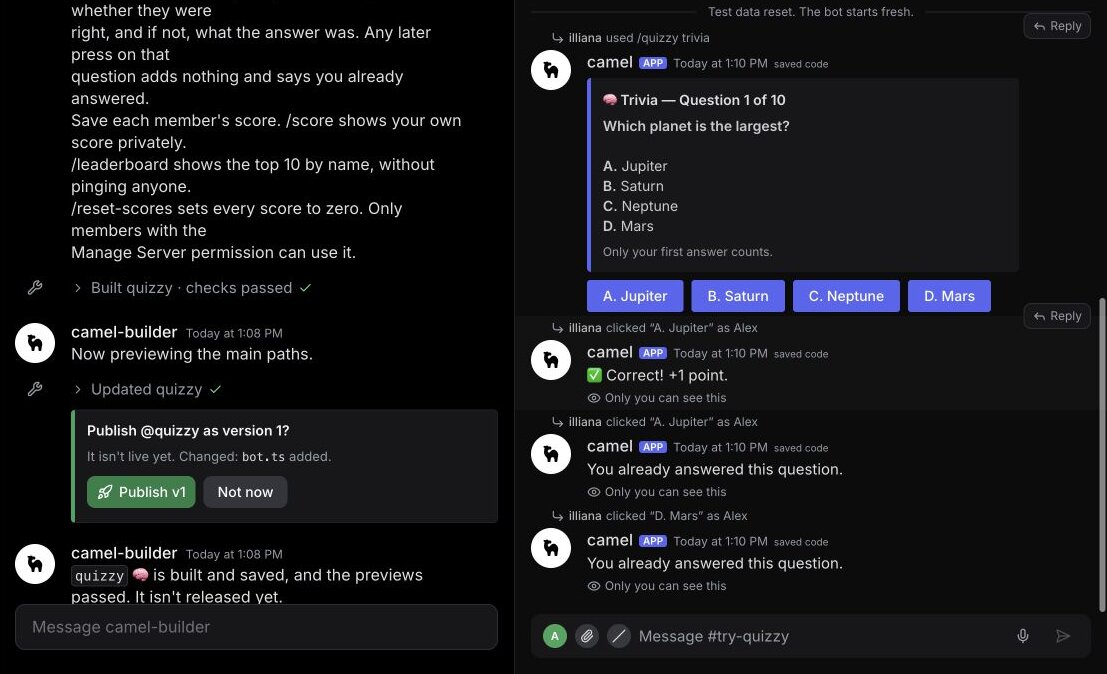
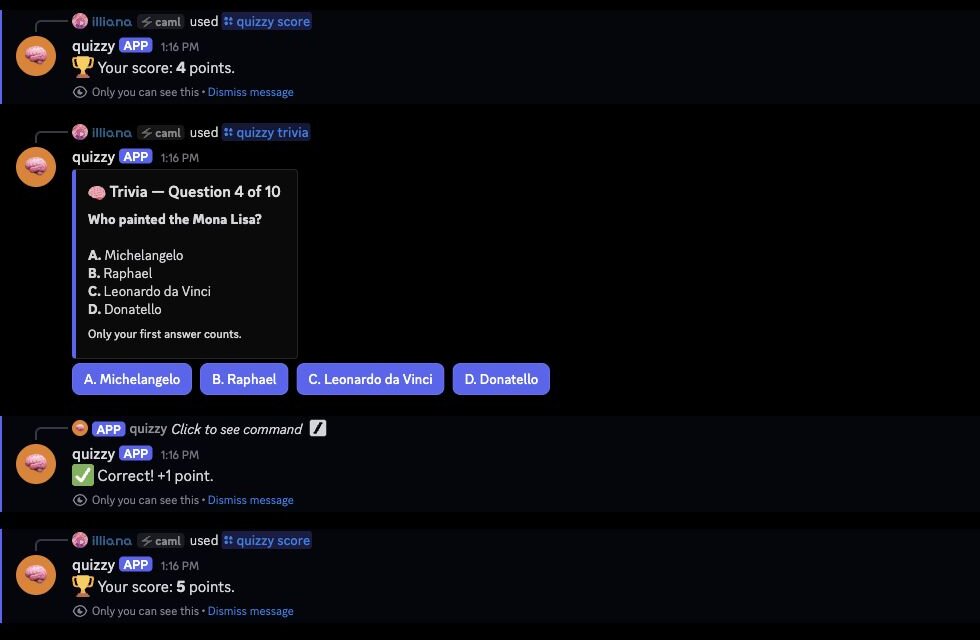
After publishing, we changed correct answers from one point to two. The test channel picked up the change before the live bot did. We published the new scoring rule and then rolled it back. The live bot went back to awarding one point, and the score we had already earned stayed at four. The next correct answer took it to five.
Key features:
-
Build and revise bots using plain English.
-
Try commands, buttons, and forms in a private test channel.
-
Test interactions as different simulated members.
-
Publish changes when you are ready.
-
Roll back to an earlier version while keeping saved data.
Free tier and pricing: Free to start without a credit card, with daily AI allowances. Credit packs start at $4.99 and camelBot Plus is $9.99 per month, according to the product page.
Main limitation: Bots currently support up to 25 slash commands each. AI features have daily allowances, and music playback is not supported. See permissions and limits.
Best for: Community owners who want a custom workflow, private testing, and hosting in one place.
Try camelBot’s no-code Discord bot maker
2 VibeBot
Best for AI generation with ready-made templates
VibeBot generates Discord.js code from a description and hosts the resulting bot. You can start with an idea or use a template for a familiar community feature.
Its getting-started guide describes a system of behaviors: a trigger starts the workflow, then actions carry it out. That makes it a useful option for creators who want conversational building with templates as a starting point.
Key features:
-
AI generation from plain-language requests.
-
A library of 41 templates.
-
AI chat personas with custom instructions.
-
Managed deployment and hosting.
-
A bot with your own name and avatar.
Free tier and pricing: The custom AI builder has a three-day trial with a $1 card check credited to the account. Pro costs $10 per month and includes $10 in monthly AI credits. Lite costs $5 per month for hosting an existing bot; it excludes the AI Bot Builder. See VibeBot pricing.
Main limitation: Continued custom AI building requires Pro, and credits are part of the cost. VibeBot Basic is a separate free shared bot with preset features, rather than the custom AI builder.
Best for: Creators who want an AI builder with templates and are comfortable with a subscription.
3 Kite
Best for free visual bot building
Kite lets you connect blocks to build commands and event listeners. It hosts your bot around the clock, including when your server is quiet, and the platform is open source.
Choose it if you want to see and adjust the steps yourself. A command might check a member's role, update a saved variable, and send a reply. Flow AI can also help build commands from a description.
Key features:
-
Visual commands and event workflows.
-
Buttons, menus, and message previews.
-
Stored variables for member and server data.
-
HTTP API requests and templates.
-
Collaboration and self-hosting options.
Free tier and pricing: Basic includes 15 commands, 10 event listeners, 10,000 monthly action credits, and hosting for a bot in up to 100 servers. Plus starts at $2.99 per month per bot. See Kite pricing.
Main limitation: Action credits limit usage as well as the number of features you can build. When credits run out, commands and events pause until renewal or an upgrade. Free Flow AI prompts are also limited.
Best for: Builders who want a capable free visual editor and are willing to assemble and maintain flows.
4 Bot Designer for Discord
Best for building and editing bots from your phone
Bot Designer for Discord, often called BDFD, supports creating bots from mobile devices and the web. Its AI builder can turn a command description into BDScript, check that it compiles, and let you apply or edit the result.
BDScript is the product's scripting language for bot commands. You can use templates and simpler command creation to get started, then learn the language as your bot becomes more involved.
Key features:
-
Android and iOS apps.
-
Community command templates.
-
Slash command support.
-
BDScript editing with built-in function documentation.
-
Managed hosting that does not require your phone to stay on.
The official app listing describes these mobile features.
Free tier and pricing: Free hosting uses time you add through the app, including ad-supported top-ups. Premium points provide paid hosting time; one point covers seven days. See the hosting guide and premium documentation.
Main limitation: Advanced customization can involve learning BDScript, and free hosting needs attention to its remaining time.
Best for: Mobile creators and people who want to grow from templates into scripting.
5 BotGhost
Best for combining ready-made modules with custom commands
BotGhost combines configurable community modules with a visual command and event builder. You can turn on common features, then build your own behavior with blocks.
That makes it a practical choice when much of your bot is conventional: welcomes, tickets, leveling, or giveaways. You can spend more of your time on the commands that are specific to your server.
Key features:
-
Visual commands, events, conditions, and actions.
-
Ready-made community modules.
-
Stored data for values such as points and warnings.
-
A marketplace for reusable creations.
-
Collaborator access and managed hosting.
Free tier and pricing: The free plan includes one bot in up to five servers, three custom commands, and three custom events. Included modules do not count toward those custom limits. Premium for one bot is $12.50 per month, or $75 billed annually. See BotGhost pricing.
Main limitation: Three custom commands can be restrictive for a bespoke project. A free bot also switches off after two days without activity and must be restarted from the dashboard.
Best for: Server owners who want common community features quickly, with room to add custom logic.
6 inventor.bot
Best for visual workflows with databases and debugging
inventor.bot combines visual flows, plugins, built-in databases, and traces and logs. Those tools are useful when a bot needs to save information and you want to understand how each workflow runs.
It also offers an AI connection through which an external assistant can build or modify flows and investigate problems. The visual project remains something you can inspect and adjust.
Key features:
-
Build using flows, plugins, or both.
-
Store information in built-in databases.
-
Investigate behavior with traces and logs.
-
Connect external AI assistants.
-
Keep version history for your project.
Free tier and pricing: The free plan includes two bot projects, a 15-server limit, 15 components, and 1 MB of database storage. Single Bot Premium costs $49.99 billed annually. See inventor.bot pricing.
Main limitation: The free storage and component limits are modest for a data-heavy project. Connecting an AI assistant is included, but access and usage costs depend on the assistant provider.
Best for: Creators who want visible workflows, structured saved data, and tools for debugging a growing bot.
7 SCNX
Best for a branded community management bot
SCNX offers a bot with your own name and avatar, built around configurable community modules. Moderation, leveling, economy, welcomes, and tickets are among the available categories.
You can also build custom commands with triggers and actions, such as opening an application form and assigning a role. Custom Commands V3, which expands the workflow system, is currently in open beta.
Key features:
-
More than 65 configurable modules.
-
A bot with your server's branding.
-
Custom slash commands, buttons, and forms.
-
Visual message and action configuration.
-
Paid plans with a separate Support Bot.
Free tier and pricing: Starter includes an ad-supported bot and up to 10 custom command triggers. Keeping it online requires periodic ad check-ins. The published EU Unlimited annual price is €53.89; regional prices and billing options vary. See SCNX plans.
Main limitation: Free operation requires check-ins. Commercial usage and removal of all SCNX branding have additional plan requirements, so business communities should review the plan documentation.
Best for: Community managers who want a broad set of configurable features under their own bot's identity.
Comparison Table
| Tool | Building approach | Free option | Main constraint |
|---|---|---|---|
| camelBot | Describe the bot to AI | Free start with daily AI allowances | 25 slash commands per bot; AI usage limits |
| VibeBot | AI generation and templates | Three-day custom-builder trial; separate free shared bot | Pro required for continued AI building |
| Kite | Visual blocks and Flow AI | 15 commands and 10,000 monthly action credits | Usage pauses when action credits run out |
| Bot Designer for Discord | Templates, AI assistance, and BDScript | Free hosting-time top-ups | Hosting time needs replenishing |
| BotGhost | Modules and visual blocks | Three custom commands, three events, plus modules | Free bots stop after two inactive days |
| inventor.bot | Flows, plugins, and external AI | Two projects with component and storage limits | Small free database allowance |
| SCNX | Modules and custom commands | Ad-supported Starter plan | Check-ins and plan restrictions |
How to Choose the Right Discord Bot Maker
Start with how you want to build. Try camelBot or VibeBot if you prefer explaining the behavior to AI. Compare Kite, BotGhost, and inventor.bot if you want to work directly with visual steps. Put BDFD on your shortlist if your phone is your main device.
Match the tool to your next three features. Write down what you need today and what you will probably add next. A simple reply, a form with staff review, and a points system are different projects. Make sure the builder's approach still feels manageable by the third feature.
Check the operating model. Read the free-plan conditions in the comparison above. A quiet server, a busy game, and an AI conversation bot can hit different limits. Choose a plan around the activity you expect.
Try one complete workflow. For a ticket bot, open a ticket as a member, claim it as staff, close it, and check the saved status. For a game, test several players and repeat the command. Finding a workflow problem early is much easier than discovering it after your server depends on the bot.
When a Free Discord Bot Maker Is Not Enough
Consider a paid plan when your bot needs more custom logic, storage, AI usage, or uninterrupted operation than the free plan provides.
Keep a rough usage estimate. How often will members run the bot? How many actions does each command take? Does every reply need AI? A small community with frequent AI conversations may have a different bill from a larger community using simple commands.
Also consider how much attention you can give the bot. If checking hosting time or restarting an inactive bot becomes a regular chore, include that time in your comparison.
If you want a practical first project, use the camelBot quickstart to build one workflow, try it privately, and add it to your server.
Frequently Asked Questions
What is the best Discord bot maker for beginners
Our pick is camelBot for beginners who want to explain a custom bot in their own words and try it before publishing. Choose a visual builder if you prefer laying out the workflow yourself. The best starting point is the tool that makes your first complete feature easiest to understand and change.
Can I make a Discord bot without coding
Yes. AI builders can generate the implementation from a description, and visual builders let you connect actions without writing code. You still need to decide how the bot should behave and check its replies, buttons, and permissions.
Which Discord bot makers are free
Kite, BotGhost, inventor.bot, SCNX, BDFD, and camelBot offer free starting options with different conditions, as detailed above. VibeBot's custom AI builder has a trial; its ongoing free Basic offering is a separate shared bot. Compare the limits against your actual workflow before choosing.
What is the difference between an AI bot maker and an AI chatbot
An AI bot maker helps create or change the bot. An AI chatbot uses AI when talking to members. A builder can create a rules-based ticket or points system without making every interaction an AI conversation. Decide whether you need AI for building, member replies, or both.
Do I need to keep my computer on
These seven products offer managed hosting. Your computer does not need to run the bot, but free-plan allowances, inactivity rules, and hosting check-ins still apply.
Can my bot have its own name and avatar
These tools support a custom bot identity through their documented setup options. For camelBot, you can start on Camel's shared app or connect your own Discord application for an independent identity and slash commands. The quickstart explains both options.
How do I start making a Discord bot
Pick one useful job and describe its trigger, reply, saved information, and who may use it. Build that workflow, test it as a member and as staff, then add it to your server. Improve it once you see how people use it.
Build Your First Discord Bot
Start with something your community already needs: a reminder, a sign-up form, a trivia game, or a better way to handle tickets.
With camelBot, you can describe the idea, try the result privately, and ask for changes before publishing.