> ## Documentation Index
> Fetch the complete documentation index at: https://camelai.com/docs/llms.txt
> Use this file to discover all available pages before exploring further.
# Recommendations
> Guide your users with intelligent question suggestions that appear at the start of a new chat
**camelAI Legacy Product** — This documentation covers camelAI's embedded analytics offering, which is no longer being actively developed. We are migrating existing customers to the new camelAI platform. For the current product, visit [camelAI](https://camelai.dev).
## Start Recommendations
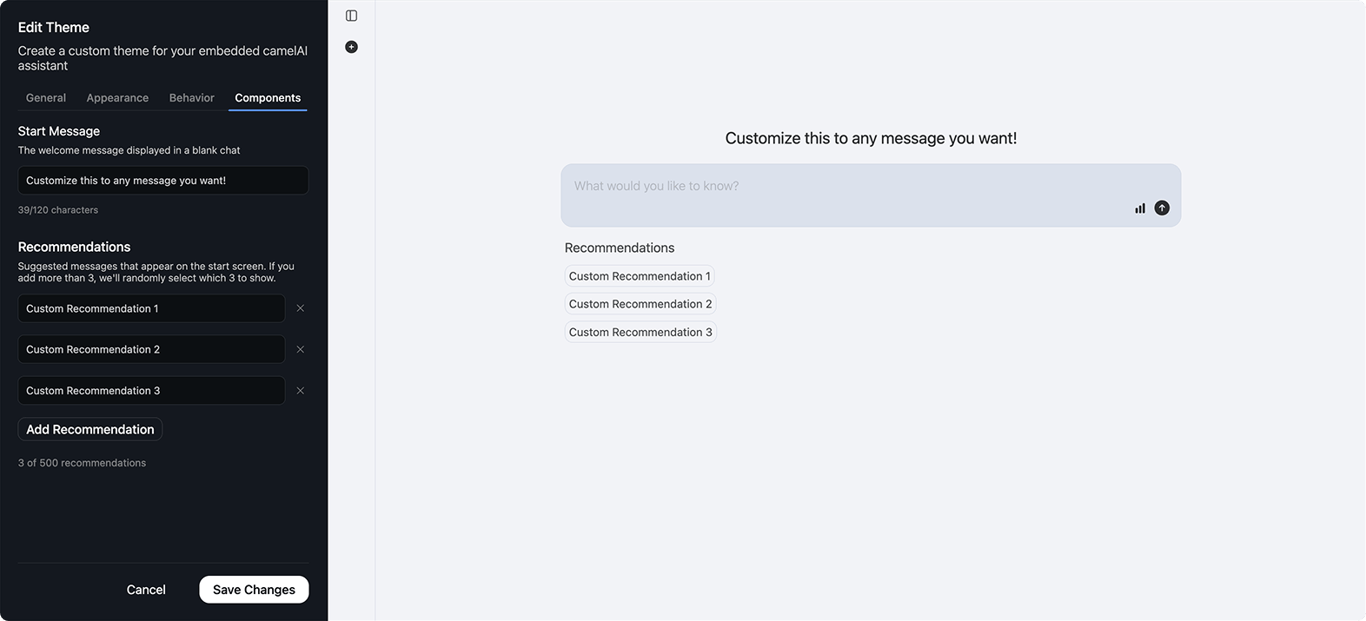
These are the three recommendation options that appear on the start screen when users starts a new chat.
 Showcase the most frequently asked questions in your organization
Feature important KPIs and metrics users should explore
Direct users to high-impact analysis opportunities
Show the range of questions camelAI can answer
### Configuration
Create a list of 1-500 recommended starter prompts
If you provide more than 3, camelAI will **randomly select** which 3 to display
Recommendations should be conversational and relevant to your data. Keep each recommendation short and sweet.
## In-Chat Recommendations
After each interaction, camelAI automatically generates three follow-up suggestions based on:
* The most recent message exchange
* Your connected data source structure
* Natural next steps in the analysis
In-chat recommendations are currently AI-generated and cannot be customized. They're designed to be contextually relevant and encourage deeper data exploration.
Showcase the most frequently asked questions in your organization
Feature important KPIs and metrics users should explore
Direct users to high-impact analysis opportunities
Show the range of questions camelAI can answer
### Configuration
Create a list of 1-500 recommended starter prompts
If you provide more than 3, camelAI will **randomly select** which 3 to display
Recommendations should be conversational and relevant to your data. Keep each recommendation short and sweet.
## In-Chat Recommendations
After each interaction, camelAI automatically generates three follow-up suggestions based on:
* The most recent message exchange
* Your connected data source structure
* Natural next steps in the analysis
In-chat recommendations are currently AI-generated and cannot be customized. They're designed to be contextually relevant and encourage deeper data exploration.